A Building in SCAN generally stores all information and data for a single site. In workflows using IES-VE models, a building on ISCAN would relate to the VE model.
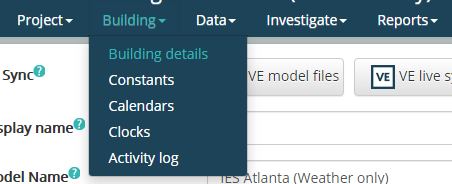
The toolbar at the top provides links to the items described in the main toolbar, project toolbar and additional links relating to the building. Hovering over or clicking on the “Building” link will show a list of Building related links. The current page will be highlighted green
Figure 18
Building details
Opens the Building details page.
Constants
Opens the Building Constants page.
Calendar
Opens the Building Calendar page.
Clock
Opens the Building Clock page.
Scenarios
Opens the Scenarios page.
Activity log
Opens the Building Activity log page.
When you synchronise an ISCAN building with a VE model, some additional pages will be added to the navigation list.
Rooms
Opens the VE Model Rooms page.
HVAC Systems
Opens the VE Apache Systems page.
HVAC Components
Opens the VE ApacheHVAC Components page.
HVAC Nodes
Opens the VE ApacheHVAC Nodes page.
Other navigation lists are also shown for Data, Investigate and Reports pages.