Part F (2022) - N Ireland > ApacheSim - compliance
Part F (2022) - N Ireland > ApacheSim – EPC
Part F (2021) – Gibraltar > ApacheSim – compliance
Part F (2021) – Gibraltar > ApacheSim – EPC
If the Coefficient (simple) approach is selected in VE preferences:
Actual building: a fixed un-editable default value will be applied to the Thermal Bridging Coefficient under APcdb > Thermal bridging tab. The uplift is dependent on the selected compliance route.
Notional building: a fixed un-editable default value will be applied to the Thermal Bridging Coefficient under APcdb > Thermal bridging tab. The uplift is dependent on the selected compliance route.
Reference building: a fixed un-editable default value will be applied to the Thermal Bridging Coefficient under APcdb > Thermal bridging tab. The uplift is dependent on the selected compliance route.
If the Psi value (detailed) approach is selected in VE preferences:
Actual building: users can pick default or enter custom Psi values for each construction on the APcdb > Thermal bridging tab. Users should ensure that the metal cladding checkbox is set or unset on APcdb > Regulations tab.
Notional building: un-editable default Psi values for each construction will be applied.
Reference building: un-editable default Psi values for each construction will be applied.
Random thermal bridging: any random thermal bridges drawn in the model will be removed in the compliance models.
Caution: regarding Psi value dimensional conventions; users should ensure that custom values entered respect the dimensional convention set in VE preferences. In the UK the internal plane convention is typical.
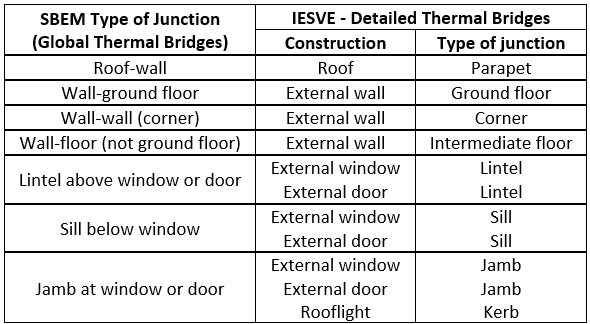
Below table maps SBEM junction types, in line with NCM modelling guide, to the IESVE Detailed Thermal Bridging Psi VALUE user interface.