Part L2 (2010) - England/Wales > SBEM - compliance
Part L2 (2010) - England/Wales > SBEM - EPC
Part F (2012) - N Ireland > SBEM - compliance
Part F (2012) - N Ireland > SBEM - EPC
Section 6 (2010) - Scotland > SBEM - compliance
Section 6 (2010) - Scotland > SBEM - EPC
Part L2 (2013) - England > SBEM - compliance
Part L2 (2013) - England > SBEM - EPC
Part L2 (2014) - Wales > SBEM - compliance
Part L2 (2014) - Wales > SBEM - EPC
Section 6 (2015) - Scotland > SBEM - compliance
Section 6 (2015) - Scotland > SBEM - EPC
Part L (2022) - Ireland > SBEMie - compliance
Part L (2022) - Ireland > SBEMie - BER
Part L2 (2021) - England > SBEM - compliance
Part L2 (2021) - England > SBEM - EPC
Part L2 (2022) - Wales > SBEM - compliance
Part L2 (2022) - Wales > SBEM - EPC
Section 6 (2022) - Scotland > SBEM - compliance
Section 6 (2022) - Scotland > SBEM - EPC
Part F (2022) - N Ireland > SBEM - compliance
Part F (2022) - N Ireland > SBEM - EPC
Part L (2022) - Ireland (Factor update) > SBEMie - compliance
Part L (2022) - Ireland (Factor update) > SBEMie – BER
If the Coefficient (simple) approach is selected in VE preferences:
Actual building: the APcdb > Thermal bridging tab is not used and is inaccessible.
Notional building: the APcdb > Thermal bridging tab is not used and is inaccessible.
Reference building: the APcdb > Thermal bridging tab is not used and is inaccessible.
The SBEM > building & system data > thermal bridging tab is solely used for defining Thermal Bridging input for SBEM.
If the Psi value (detailed) approach is selected in VE preferences:
Actual building: users can pick default or enter custom Psi values for each construction on the APcdb > Thermal bridging tab. Users should ensure that the metal cladding checkbox is set or unset on APcdb > Regulations tab.
Notional building: the APcdb > Thermal bridging tab is not used and is inaccessible.
Reference building: the APcdb > Thermal bridging tab is not used and is inaccessible.
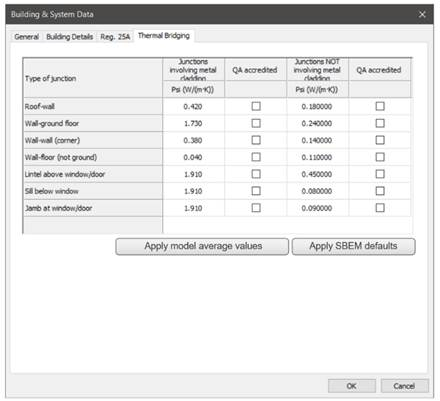
Type of junction: only Psi values for the SBEM junction types (see fig 25) are utilised for SBEM input. Psi values entered for other junction types e.g. roof transition, rooflight kerb etc. are ignored for SBEM purposes.
The SBEM > building & system data > thermal bridging tab allows users to define Thermal Bridging input for SBEM. Users can edit the Psi values and/or apply values as follows:
Use the Restore defaults button to apply SBEM default values.
Use the Apply model average values button to apply length weighted Psi values collated from the actual building assigned data.
Repressing either button re-applies the values to the entry boxes, overwriting any use entered values.
Random thermal bridging: any random thermal bridges drawn in the model will be removed in the compliance models.
Fig: UK Compliance SBEM building & system data > thermal bridging tab.
Caution: regarding Psi value dimensional conventions; users should ensure that custom values entered respect the dimensional convention set in VE preferences. In the UK the internal plane convention is typical.