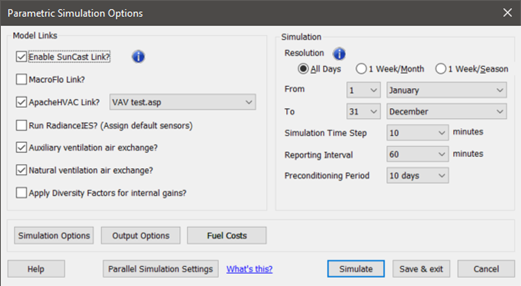
In the parametric simulation options dialog the resolution feature mentioned in section 3.4 allows the user to change the definition of the period to be made up of either the default contiguous days or to be made up of sub-periods (month or season) that are simulated (a week per sub-period).
There are three options available:
o All Days: if setup for 365 days from 01 January to 31 December, this option will represent 8,760 simulated hours per year, i.e. a traditional simulation via ApacheSim. Note that for many Building Energy Compliance Codes & Building Standards, there is often a requirement for simulating 8,760 hours per year.
o 1 Week per Month is a faster performance. For 365 days from 01 January to 31 December, will simulate 2,016 hours per year (24 hours * 7 days * 12 months) which is 23% of the ‘All Days’ simulation. However, the 2,016 hours are extrapolated to report 8,760 hours per year. The Parametric tool will select the third week of each month. This speed-up performance option is licensed separately to those with multiple seats.
o 1 Week per Season: is the fastest performance. For 365 days from 01 January to 31 December, will simulate 672 hours per year (24 hours * 7 days * 04 months) which is 8% of the ‘All Days’ simulation. However, the 2,016 hours are extrapolated to report 8,760 hours per year. The Parametric tool will select the third week of the middle month of each season. This speed-up performance option is licensed separately to those with multiple seats
For smaller models selecting a lower resolution in the parametric resolution feature typically does not offer an advantage.
For larger models selecting a lower resolution in the parametric resolution feature provides a trade-off between quality and speed and is perhaps most applicable to early-stage design studies (see section 2 – strategy).