Importing Roof Ventilation terminals
To get started with Passivent Roof Terminals, you will need to import the required unit(s) into your building model.
Multiple Roof Terminal types can be imported into a project, however, note that only one type can be used in a single room. Multiple instances of the same type (up to six) can be inserted in a single room.
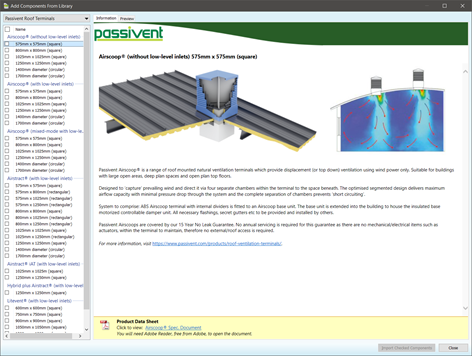
The units are represented in the VE by components – when placed into a room, the room will automatically be updated to make use of the Passivent Roof Terminals unit and associated data. You can import the units by clicking on the Import the Passivent products from library item in the Navigator – this will open the Add Components From Library window with the Passivent Roof Terminals:
Fig 5: Component library
The Passivent Roof Terminals includes sections for the different Roof Terminal products; note the difference between products without low-level inlets and with low-level inlets.
· Products without low-level inlets are standalone roof terminals.
· Products with low-level inlets are roof terminals which work in conjunction with associated room wall louvres and windows that are drawn by the user.
For the roof terminal products there are five types that you can import into the VE; in each type there is a choice or size and shape:
· Airscoop®.
· Airstract®.
· Airstract iAT®.
· Hybrid Plus Airstract®.
· Litevent® Airstract.
Details on selecting which type of unit is best suited for your project should be discussed with Passivent. You can review the overview of each unit by clicking on it – this will also lead to the Passivent specification document.
To import the units, click on the checkbox next to the type(s) you want, then click on the Import Checked Components button. This will then copy the relevant component(s) into your model’s component library, making them ready to be assigned to rooms.
In addition to the unit(s) themselves, the import of a Passivent Roof Terminals unit to the model will also import some data into the project:
· Apache room templates for Passivent Roof Terminals ‘spaces’.
· Apache constructions for Passivent Roof Terminals surfaces.
· Macroflo types for Passivent Roof Terminals louvres.
· Apache profiles for Passivent Roof Terminals louvres and dampers (doors).
· ApHVAC network files for Passivent Airstract® iAT and Passivent Hybrid Plus Airstract® types.
· MacroFlo opening types for louvres and windows for assignment to room louvres and windows.
Once the units have been imported, you can close the Add Components from Library window by clicking on the Close button.