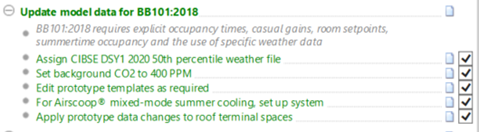
In order to carry out a BB101:2018 performance analysis the model and data on target rooms need to be set-up in accordance with the requirements of standard.
This involves assigning an appropriate weather file (not enforced), the background CO2 level (not enforced) plus importing and assigning prototype data to target rooms. The Navigator leads you through this process. If you are using Airscoop® mixed-mode (mechanical cooling) you will also need to setup the cooling system manually.
Importing prototype data adds room template data: profiles, gains and infiltration to the model. All are appropriately labelled.
The creation of a Passivent Roof Terminals room group allows target rooms to be identified and the imported data changes to be applied to the target rooms quickly.
Fig 4: – Navigator BB101 data assignment
The changes applied to the target rooms are as follows:
Apsys methodology (or ApHVAC for Airstract iAT, Hybrid Plus Airstract).
Room heating operation.
Room heating set-point variation profile.
Room cooling profile set to cooling operation.
Room occupancy profile.
Room lighting profile.
Room small power profile.
For template gains:
Occupancy gains 32 people 70/50W.
Lighting gains 7.2 W/m2.
Small power gains 10 W/m2.
The target ApHVAC networks (for Airstract iAT, Hybrid Plus Airstract) will include assignments for:
Ventilation flows.
Room heating operation.
Room heating set-point variation profile.
Room cooling profile.
Users can subsequently edit the gains as required within the limits of BB101:2018 if required.
Other changes made:
Infiltration 0.25 ACH continuously ON.
System o/a supply variation profile turned off.
Existing auxiliary ventilation air exchanges variation profile turned off.
Existing natural ventilation air exchange variation profile turned off.
Comfort settings will be set to nominal air speed 0.1m/s, elevated air speed 0.3 m/s, MET 1.2, CLO MOD profile min 0.5 max 1.0.