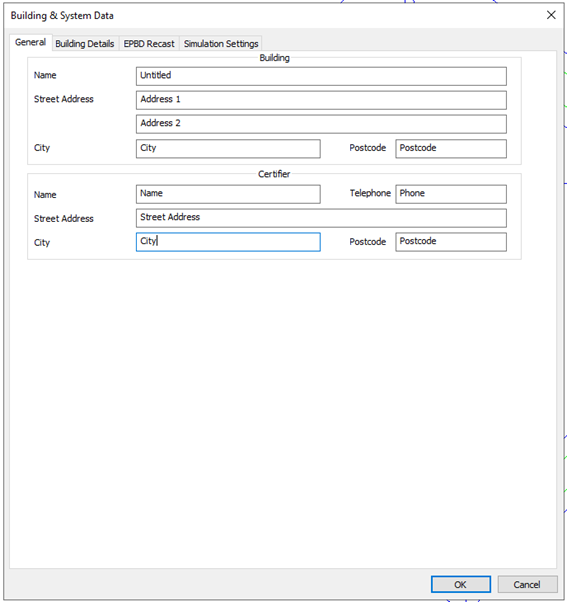
General
Building & System Data > General tab and its user defined inputs. This tab is consistent with other UK and Ireland compliance routes, and factors a review between the latest iSBEM (England, Scotland and Wales) and iSBEMgi (Gibraltar equivalent).
Building Details
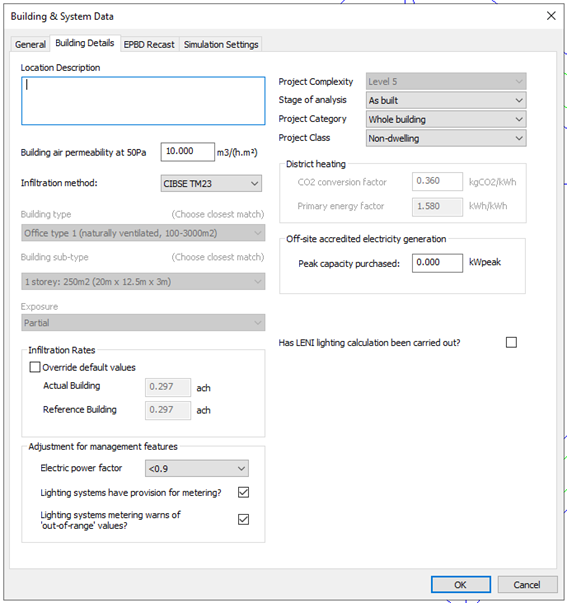
Building & System Data > Building Details tab and its user defined inputs. This tab is consistent with other UK and Ireland compliance routes, and factors a review between the latest iSBEM (England, Scotland and Wales) and iSBEMgi (Gibraltar equivalent).
Where;
Building air permeability at 50 Pa (m3/(m2.h))
The air permeability is used to calculate infiltration rates for rooms in the actual building.
Infiltration method
Choose between alternative methods for the calculation of infiltration rates as a function of permeability: CIBSE Guide A and CIBSE TM23.
Building Type, Building sub-type, Exposure
These settings are inputs to the CIBSE Guide A method.
Choose the options that best describe the building. Infiltration rate settings will be updated accordingly.
Infiltration rates
Infiltration rate for the Actual calculated using the selected Infiltration method from the parameters above. The reference building has set permeability applied.
Tick Override default values to enter alternative values (if supported by suitable justification). If the actual building values are edited using this facility the reference building values will be adjusted in proportion.
Adjustment for management features
These settings allow credit to be taken in the BER calculation for management features applied to electrical power and lighting.
-
-
Lighting systems have provision for metering?
-
Lighting systems metering warns of ‘out-of-range’ values?
Project Complexity
Set the project complexity according to the official guidance.
Stage of analysis
Set whether the building is analysed ‘As designed’ or ‘As built’.
Project Category and Class
User defined dropdown options are as follow:
-
-
-
Extension to existing building
-
-
-
Naming conventions for Project category and class align with iSBEMgi_v4.2.a user interface (UI), and map to the Gibraltar 2024 National Calculation Methodology (NCM) modelling guide in the following way:
|
Gibraltar 2024 NCM modelling guide
|
Project Category
|
Project Class
|
|
New dwelling
|
Whole building
|
Dwelling
|
|
Extension to existing dwelling
|
Extension to existing building
|
Dwelling
|
|
New non-dwelling
|
Whole building
|
Non-dwelling
|
|
Extension to existing non-dwelling
|
Extension to existing building
|
Non-dwelling
|
|
Gibraltar 2024 NCM modelling guide
|
Project Category
|
Project Class
|
District Heating
This section is only active when a system with Heat source/fuel type set to District Heating is assigned to a room in the building.
District Heating CO2 Conversion Factor: Enter the CO2 Conversion Factor to be used by systems whose heat source/fuel type is District Heating.
Primary Energy factor: The conversion factor used to calculate the Primary Energy consumption associated with the District Heating system energy use.
Off-site accredited electricity generation
In line with Gibraltar 2024 NCM modelling guide, electricity generator is classed in the following forms:
Refer to Electricity generation section for information regarding On-site.
For off-site electricity generation a user input parameter is included within the via the Building setting > Building & Systems data > Building details tab.
Refer to ApacheSim – Compliance and EPC sections, for further information on how on-site and off-site electricity generation feeds into the Gibraltar Part F (2007) compliance and EPC reports.
EPBD Recast
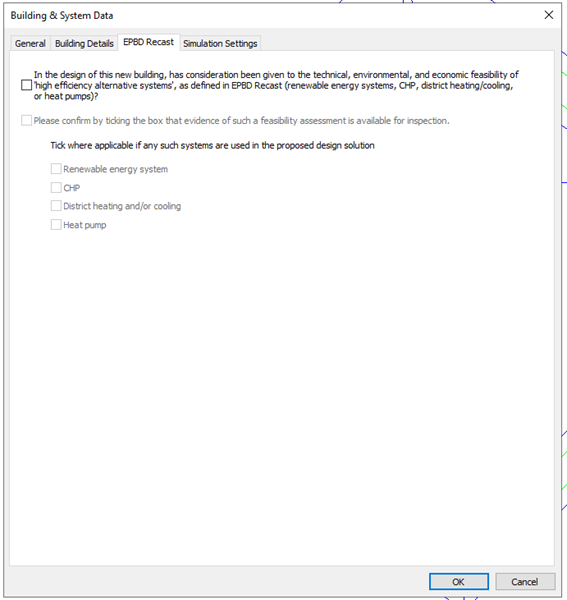
Building & System Data > EPBD Recast tab and its user defined inputs. This tab is consistent with other UK and Ireland compliance routes, and factors a review between the latest iSBEM (England, Scotland and Wales) and iSBEMgi (Gibraltar equivalent).
Simulation settings
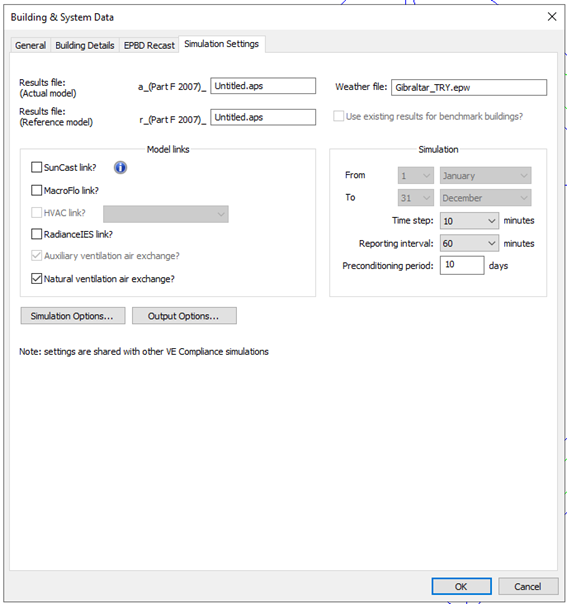
Building & System Data > Simulation Settings tab and its user defined inputs. This tab is consistent with other UK and Ireland compliance routes, and factors a review between the latest iSBEM (England, Scotland and Wales) and iSBEMgi (Gibraltar equivalent).
Where;
The special features applying for the various types of VE Compliance simulations are as follows. Results file names are given a prefix to distinguish the following types of simulation:
-
Compliance simulation for actual building (including test run) - prefix ‘a_’
-
Compliance simulation for reference building (including test run) - prefix ‘r_’
For compliance simulations and compliance test runs the weather file is automatically set to the Test Reference Year (TRY) appropriate to the building location.
Options are provided, as in the Apache module, to incorporate
-
SunCast link? – tick this box if you wish to use SunCast solar shading data in the simulation of the actual building.
-
-
-
If these options are used, special care must be taken with ventilation settings and profiles to ensure that these are consistent with the standard room conditions laid down for Part F (2007) simulations. Guidance on this issue is provided in Appendix A. Where an ApacheHVAC system is used, the standard ventilation rates may be included in the system air supplies. See Appendix A for further guidance on ventilation settings.
-
Radiance link? Tick this box if you wish to use data from Radiance to inform lighting control/dimming in simulation
-
The ‘Auxiliary ventilation air exchange?’ check box is ticked automatically. This is because auxiliary ventilation air exchanges form part of the standard room conditions for Part F (2007) simulations.
-
Natural ventilation air exchange? – tick this box if you have specified any ventilation by means of natural ventilation air exchanges
In the case of compliance simulations, ticking the check box Use existing results for benchmark building bypasses the simulation for the reference building in cases where this building has not changed since the previous compliance simulation. This would be the case if, for example, the only input to have been changed was a system efficiency.
In the case of compliance simulations, the simulation period is forced to the whole year, and Simulation Options are forced to standard settings to ensure uniformity.
Preconditioning period – make sure (using test runs if necessary) that this is sufficient to establish a realistic starting condition for the simulations.
You may also change the reporting interval and output options to generate more detailed results data for Vista.
Note that the weather file is forced to the appropriate TRY dataset for compliance simulations. If this file is not present compliance simulations will not be enabled.