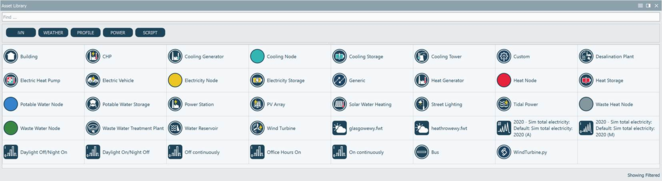
The asset library contains various assets which are used to define 2D iVN (level 1) and 2D infrastructure (level 2) models (see Figure 3-33). A default set of assets, including weather data, profiles and installations are included with the iVN. Common assets are imported as defaults into every project on creation and are available in the asset library. Common filters and a search box are available for reducing the set of displayed assets for models which have a large number of assets.
The iVN can import specific weather data for your location from files shipped with the iVN or from external sources, for example .fwt and .epw weather files (Refer to section 3.4.2.3). The iVN can also directly connect to IES-iSCAN projects enabling the import of real data. A SCAN project URL and API token is required to access iSCAN (Refer to section 3.4.2.2).
Once imported into the project, assets are available for assignment via the asset library. Typically, assets are dragged and dropped into the 3D and 2D workspace views or onto parameters displayed in the data inspector or are available for selection in appropriate menus. Once most assets are added to a model, they become objects.