In iCD, it is possible to complete an energy simulation with a basic energy cost analysis.
The cost analysis will allow the user to get some understanding the monthly energy costs per commodities over a community.
If photovoltaic panels are present in the models, the cost analysis can also assess the savings generated from their electricity yield.
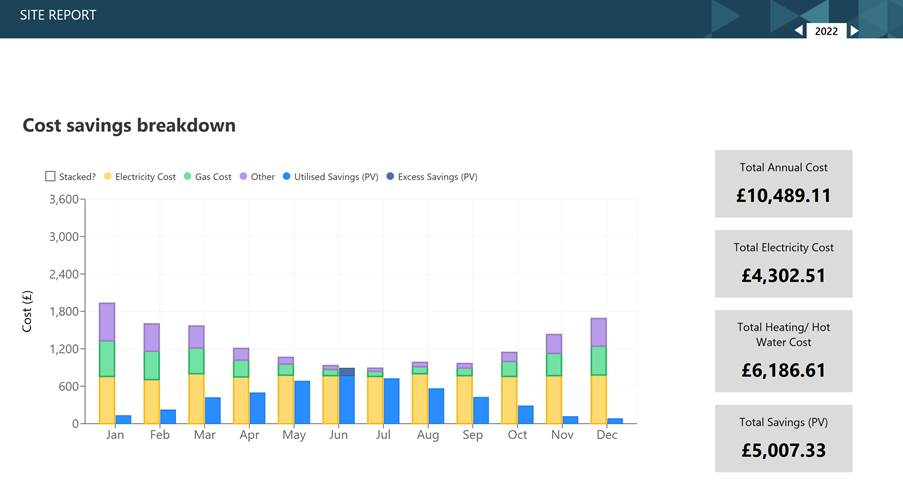
Cost analysis results can be visualised in the Cost Savings Breakdown report. This report is accessible in Extension > IES iCD > Reports > Site Reports > Cost Savings Breakdown.
This report consists in a bar chart showing monthly energy costs per commodity (electricity, gas and “other”) as well as the savings earned through PV electricity generation.
In order for this report to give relevant results, the following steps are necessary:
- Set the Resources’ cost per unit;
- Set the Fuel type for heating and hot water for the buildings;
- Set the PV layout if any;
- Perform an energy/water simulation.
Once these steps are complete, the user can visualise the Cost analysis in the Cost savings Breakdown report.
Resource costs
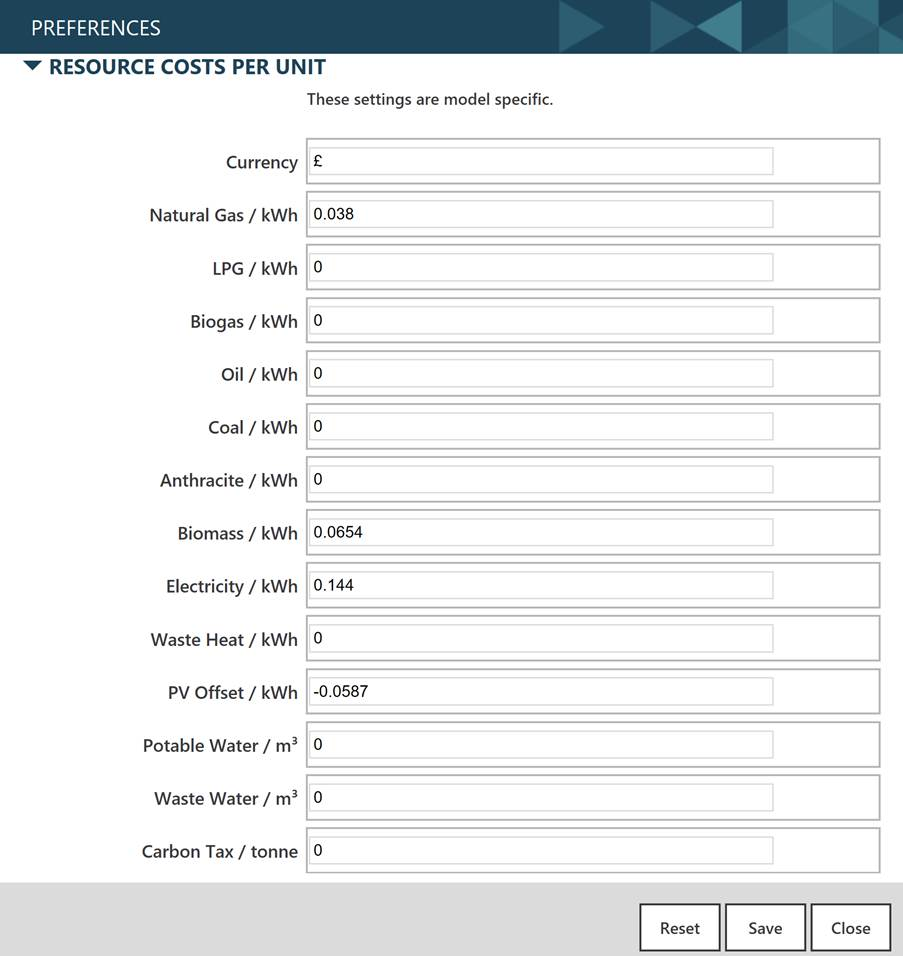
Resources cost settings can be accessed in Extension > IES iCD > Preferences under the section Resource costs per unit.
The cost for all the resources used in the project can be set in this section as well as the desired currency.
Note: If the model includes some PV panels, it is important to make sure the value for PV offset / kWh is set. As this value will represent a saving, please note its value should be negative.
For more detail on the preferences panel see chapter 3.3.3 Resource cost per unit.
Setting the fuel type
To set the fuel type for building the user should select the building and open the Building/room query tool (see chapter 4.9.1 QUERY TOOL). Under the section HVAC Services, can be set the appropriate Fuel type (heating & Hot water) can be selected amongst the list of available commodities.
Note: For any commodity selected in Fuel Type, it is important to set its cost per unit in the preferences panel (see previous note).
Creating Photovoltaic Panels
For more information on PV panels creation and settings, see chapter 4.10 Photovoltaic (PV) panels.
Note: If PVs are in the model, it is important to set the value for PV offset / kWh in the preferences panel (see previous note).
Energy/water simulation
In order to visualise cost data, an energy/water simulation should first be run in order to assess the site’s energy consumption.
For more information on energy/water simulations, see chapter 5.4 iCD Simulation Launcher.
Cost savings breakdown
Cost savings can be visualised in the Cost savings breakdown. For more detail about this report, see chapter 6.2.2.4 Cost savings breakdown.