Variation profile creation
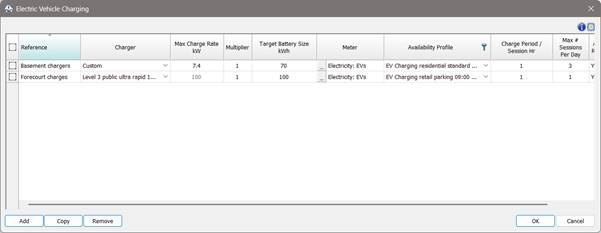
Once EV charging instances are entered and the dialog is closed the VE auto-generates a variation profile for each instance that is used in an Apache simulation.
Fig: EV charging example instances.
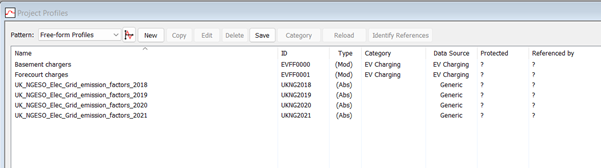
Fig: ApPro > Free-form profiles category > auto-generated profiles
The auto-generation for each instance works as follows:
1. A session profile is created. This utilises the following inputs:
Max charge rate kW (charger)
Battery capacity kWh
Charging session in hours
Battery charging curve
Battery initial charge %
Battery max charge %
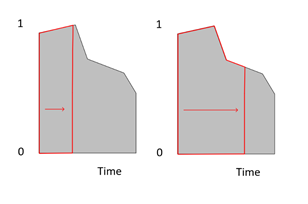
The session profile ‘shape’ will reflect part of the charging curve; the extent is dependant on the inputs.
Fig: Example session profiles:
a. slow charger or short session / b. fast charger or longer session
The session profile is temporary and is not saved in the project.
2. A variation profile is created. This utilises the following inputs:
Session profile
Availability profile
Charging period
Sessions per day
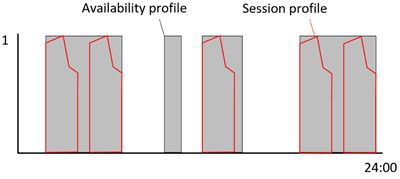
Session profiles are fitted to the availability profile, over each 24-hr period up to the number of sessions per day if the number of session profiles fit. If the session profile period is greater than an ON period (value >0) in the availability profile it will not fit and that period in the availability profile will not have charging assigned.
Fig 7: Fitting a session profile to an availability profile.
The variation profile is saved as a free-form profile assigned to the EV charging instance of a new category ‘EV charging’.
Because of the typically short ‘pulse’ nature of EV charging profiles a new sub-timestep evaluation 'precise' mode has been added to Apache so that the energy integrals for EV charging sessions are correct regardless of the Apache simulation time-step.
The variation profile can be viewed in ApPro > free-form profiles by double clicking on the profile to open the free-form profile editor.
Free-form profiles can also be accessed and exported using VE-Scripts.