Random transmittances can be utilised to define both random and non-repeating transmittances that are non-standard i.e. not generated automatically.
Random transmittances are defined by adding geometry to the model in VE Model-iT at surface decomposition level (similar to adding openings) and then assigning a random thermal bridge construction type in VE-Apache. Random transmittances cannot be added to openings.
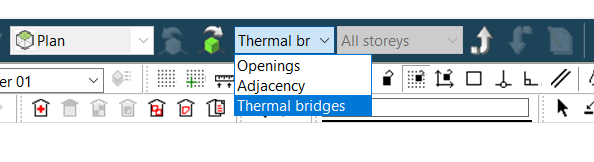
In VE Model-iT utilise the decomposition tool to Navigate to a target surface, then select Thermal bridging mode in the mode combo-box.
Fig: VE Model-iT Random Thermal Bridge geometry types
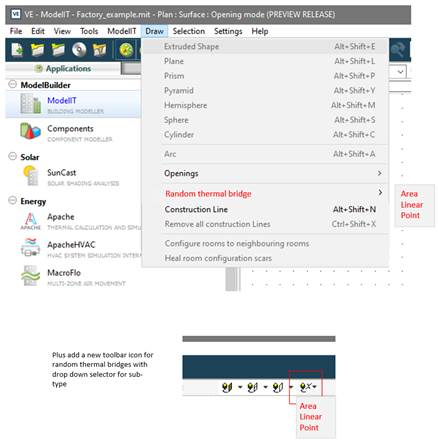
In VE Model-iT Random Thermal Bridge geometry types can then be selected on the draw menu or on the toolbar. Three geometry types are provided – area, linear and point.
Fig: VE Model-iT Random Thermal Bridge geometry types
Select the Random Thermal Bridge geometry type to reflect the design detail, for example a balcony might be a slab (area) or bracket (linear) or bolted steel (point). Navigate to the target surface in the view or via the object tree. Draw the Random Thermal Bridge geometry in the desired location on the surface.
The Random Thermal Bridge geometry tools operate as follows:
-
Area – a two-dimensional stretchable rectangle.
-
Linear – a one-dimensional stretchable thin rectangle (representing a line *).
-
Point – a fixed small square (representing a point *).
-
* Linear and point tools have minimum fixed dimensions so that the linear and point objects are practically visible and selectable in the view window.
Random Thermal Bridge area, linear and point geometry objects are ignored in VE-Suncast simulations.
Random Thermal Bridge area geometry object surfaces are passed to VE-Apache simulations as opaque sub-surfaces (like all opaque surfaces).
Random Thermal Bridge area geometry objects are most likely to be utilised for specific details like balconies, where there is a continuous construction involved, like a concrete slab, and where there is a significant area of a differing construction and a perimeter / linear detail. In such cases there will may likely to be a shading object involved in-front of the Random Thermal Bridge area object. The shading object plays no part in VE thermal bridging.
Random Thermal Bridge geometry objects can be deleted using select and the delete tool.
Random Thermal Bridge geometry objects require a Random Thermal Bridge type assigning in VE-Apache (similar to assign a construction).
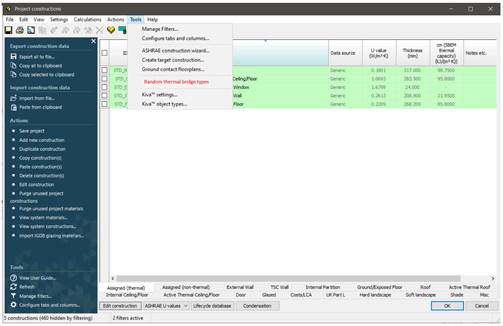
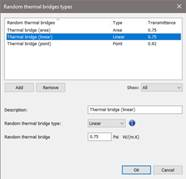
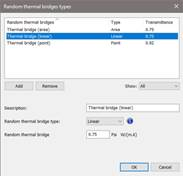
Random Thermal Bridge types are defined in ApCDB using the Random Thermal Bridge types tool on the Tools menu.
Fig: ApCDB Random Thermal Bridge types
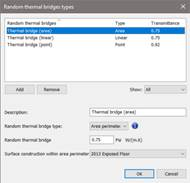
The Random Thermal Bridge types tool dialog allows the user to define Random Thermal Bridge types for assignment as follows:
-
A types list: use the list to select a type to edit.
-
Use the list add and remove buttons to edit the list.
-
Properties related to the selected type, including random thermal bridge type and Psi/Chi value. For the area type a construction is also specified to define the surface area contained within the object.
Fig: ApCDB Random Thermal Bridge types tool
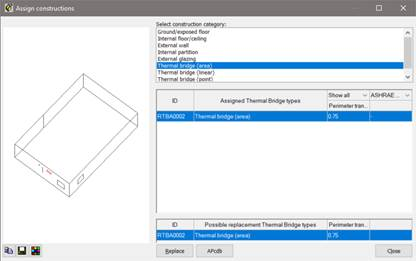
The Random Thermal Bridge types are assigned to the Random Thermal Bridge geometry objects using the VE-Apache Assign constructions tool (like constructions). After making an object(s) selection open the VE-Apache Assign constructions tool and pick the required Random Thermal Bridge category to make or change the assignment.
Fig: Apache assign constructions tool
For Random Thermal Bridges length or count is automatically determined from the model geometry. For the area type:
-
The geometry rectangle perimeter is taken-off for use with the Psi value.
-
The geometry rectangle area is treated as a normal opaque sub-surface with an assigned construction.