Users can enter EV charging loads in the VE using the new EV charging feature available on the Apacheview toolbar, adjacent to the Miscellaneous Energy Consumption icon.
Fig: EV Charging icon on the Apacheview toolbar
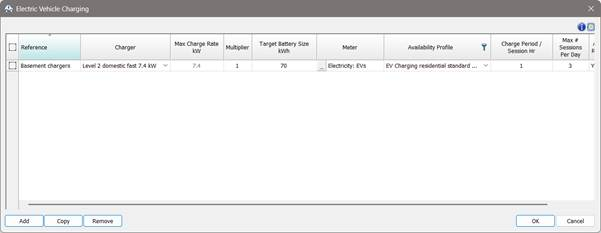
The icon opens the EV charging dialog.
Fig: EV Charging dialog
This tabular interface allows the user to define one or more EV Charging instances. For a typical project a user might choose to enter multiple instances (rows) to describe:
Different chargers e.g. some fast, some slow.
Different vehicles / battery size e.g. pool and private vehicles.
Different usage e.g. long or short charging sessions.
The same chargers utilised differently at different times e.g. short sessions in the daytime and long sessions at night.
Column entries in the dialog:
Reference: a label to describe the EV Charging instance. This label will also be used in the name for the auto-generated free-form variation profile.
Charger: a list of typical charger ratings, selecting one enters a value in the Max charge rate column. Selecting custom enables the Max charge rate for manual entry.
Max charge rate kW: set by the choice in the Charger column unless custom is selected then manual entry is enabled.
Multiplier: sets the number of chargers in the charger installation (a simple multiplier) for the row.
Target battery size kWh: sets a target usable vehicle battery size. This is utilised with the battery settings to determine the auto-generated variation profile. Users will have to make a sensible average estimate for this value; depending on region (size of vehicle) and locale vehicle batteries may be smaller in urban locales (40-60 kWh) and larger say on highway locales (70-100 kWh).
Meter: the meter the EV electrical energy should be assigned to.
Availability profile: a modulating profile that describes when charging can occur.
Charge period / session Hr: how long a vehicle is charged for in each charging session.
Max # sessions per day: the number of charging sessions per day.