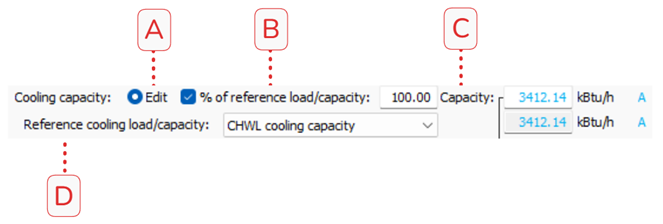
The Cooling capacity section provides the most common inputs used to size HRC. The HRC may be sized using this section or the Heating capacity section but not both.
A.Editfunctions as a toggle, enabling user input for either Cooling capacity or Heating capacity. If Edit is selected on the Cooling capacity section then the HRC Capacity can be controlled via cooling references and the Heating capacity is constained by the derived or input capacity on the Cooling capacity section. The displayed, read-only Heating capacity is derived by:
B.% of reference load/capacityis a checkbox to enable or disable the use of a percentage to size the HRC based on a user-selectable reference. The reference at which determines the percentage basis is defined in the Reference cooling load/capacity. When Autosize is enabled, the % of reference load/capacity is required, otherwise it may be enabled or disabled at user discretion. Changing the % of reference load/capacity will change the capacity of the HRC by the input percentage of the selected Reference cooling load/capacity.
C.Capacitylists the heat extraction rate of the HRC evaporator side under reference conditions. If Edit is selected then the capacity may be overridden, if Edit is unselected then the capacity is read-only and references the Heating Capacity section.
D.Reference cooling load/capacityis a dropdown selection that determines what reference is to be used for the % of reference load/capacity input. The reference may be either the CHWL cooling capacity or Max CHWL load in heating season.
oUpon selecting CHWL cooling capacity, the % of reference load/capacity will update to match the HRC capacity divided by the CHWL cooling capacity.
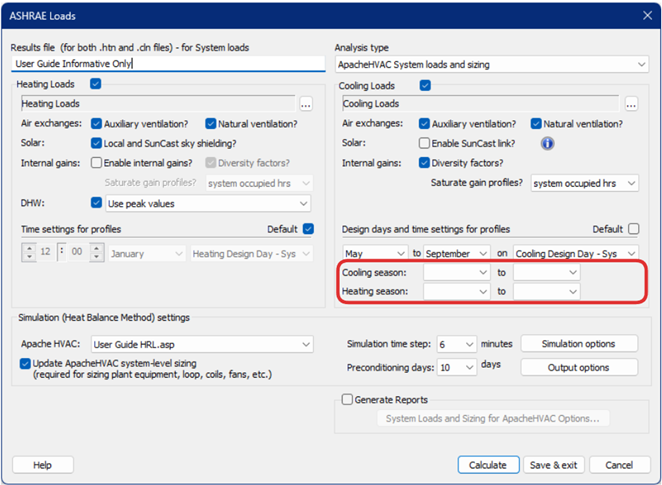
oUpon selecting Max CHWL load in heating season, the % of reference load/capacity will update to match the HRC capacity divided by the Max CHWL load in heating season. Its important to note that when heating/cooling seasons are referenced in a system that these seasons are defined in the ApacheHVAC System loads and sizing settings highlighted in the image below. These settings will only appear when a system references heating or cooling season.
Figure:ApacheHVAC System loads and sizing settings (Heating and Cooling Season)