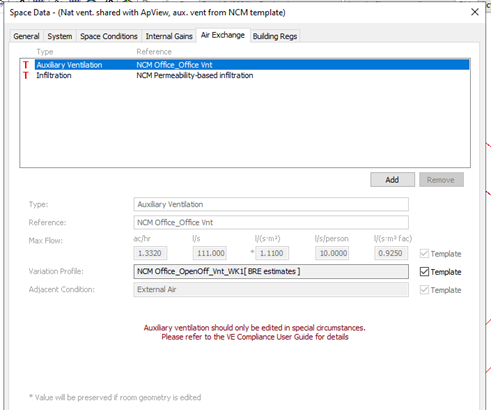
The Air Exchanges tab displays NCM activities database settings for auxiliary ventilation and infiltration.
Some of the data on the Room Template’s Air Exchange tab is used in VE Compliance, and some is overridden. The rules are as follows.
The activity (NCM Template) for a room specifies a rate and a schedule for minimum ventilation supplied to the room. This ventilation appears in the NCM template as an air exchange of type Auxiliary Ventilation, which replaces any other Auxiliary Ventilation air exchanges that might be assigned to that room by means of the Room Template or manual additions. By contrast, other types of air exchange (those of type Infiltration or Natural Ventilation) assigned to the room by the template or otherwise are retained in VE Compliance.
One further rule is that any settings for ‘System outside air supply’ on the System tab are, like Auxiliary Ventilation air exchanges, ignored in VE Compliance.
Under normal circumstances auxiliary ventilation should not be edited, as this data forms part of the NCM activity specification. There is one exception to this rule: if ventilation is provided by an ApacheHVAC system (at the rate set in the NCM template), it would be necessary to turn off the auxiliary ventilation.