4.9.2 DHW System and Sizing calculation
Design Model
Similar to “DHW load and DHW Zones” section for Design Model the DHW system is also a user-defined system. Users can define the DHW system as well as the heating source of the DHW system. Sections 3, “Selecting and Editing DHW Heating Source” and Section 4 “Editing DHW System in ApacheHVAC,” of the “Modeling Domestic Hot Water” FAQ explains this in detail.
The sizing calculation of the DHW system can be done by checking the “DHW” box in the “ApacheHVAC Room and HVAC Zone loads” and “ApacheHVAC System loads and sizing” calculation dialog box. The details of this have been explained in section 5 “Room Load & System Load calculation” of the “Modeling Domestic Hot Water” FAQ.
Proposed Model
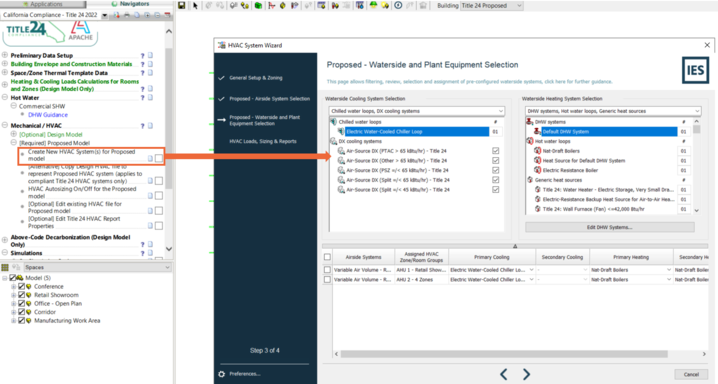
DHW system can be created while generating the proposed HVAC system using the “Create New HVAC System(s) for Proposed model” step in the navigator. Assigning the DHW system and heating system is a two-step process:
a) first step (in Step 3 of the HVAC Design Wizards) is to select and assign the DHW system and
b) the second step (in Step 4 of the HVAC Design Wizards) is to assign the DHW Heating Source.
Both of these steps are explained in detail below.
Both of these steps are explained in detail below.
Step 1: Selection and Assignment of DHW system in Proposed model
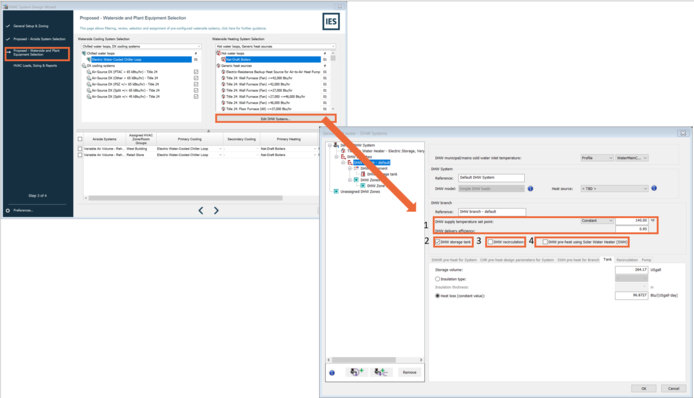
In the third step of the “HVAC System Design Wizard,” users can click on “Edit DHW Systems…” and select the DHW system. Note that users will not be able to assign the Heating source at this step, therefore Heat Source” is set to “< TBD >.” See the screenshot below.
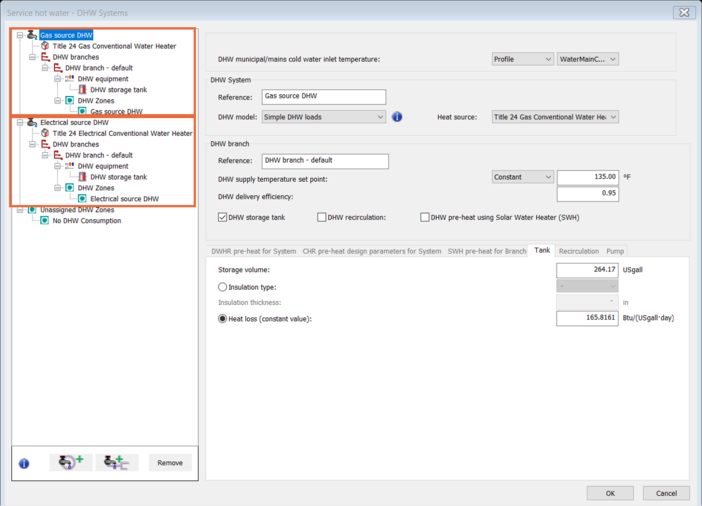
After clicking “Edit DHW Systems…” the “Service hot water” dialog box will open. In this dialog box users have an option to add and edit the type of DHW system in their model. The edits/options user have are:
1) DHW supply temperature setpoint. Users can define the DHW water temperature for the system from this section.
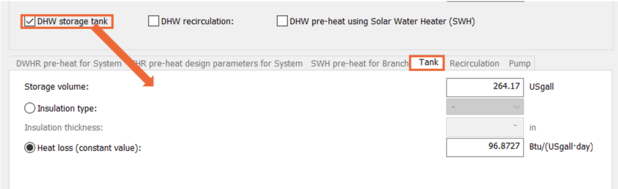
2) DHW Storage Tank. Checking this box lets the user edit the volume of the DHW tank and the Heat loss through the tank.
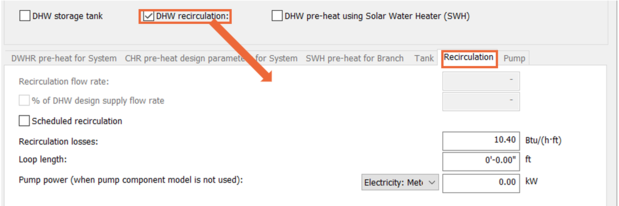
3) DHW recirculation. If the user’s DHW system has a “Recirculation loop” in the proposed model, they can model that by checking the “DHW recirculation” box. By doing so they can define the recirculation pump power and recirculation losses in the DHW system.
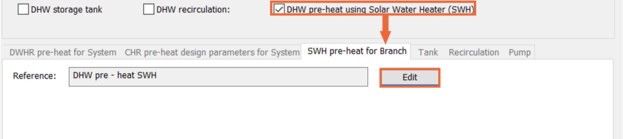
4) DHW pre-heat using Solar-Water Heater (SWH). If the user’s model has Solar Water Heater system that is preheating the DHW system, they will need to check the “DHW Pre-heat using Solar Water Heater” box and define the solar water heater system in the model.
Step 2: Assigning the heating Source and the size of the DHW system in the Proposed model
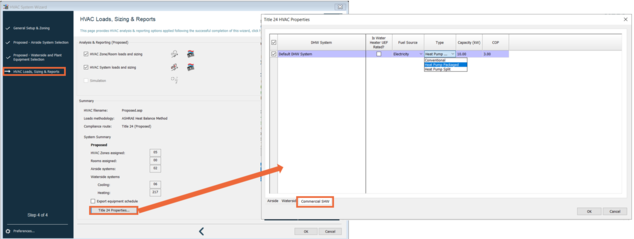
In the fourth step of the “HVAC System Design Wizard,” users can click on “Title 24 Properties…” This will open the “Title 24 HVAC Properties” dialog box. Users will have to click on the “Commercial SHW” tab, at the bottom of the dialog box, to assign the heating source for the DHW system. See the screenshot below.
Users have the option to select an Electrical or a Natural gas as the “Fuel Source” for their model. Based on the selection user will need to provide further details about their DHW Heating source. The input data user will need to provide are detailed below.
Fuel Source set to Gas:
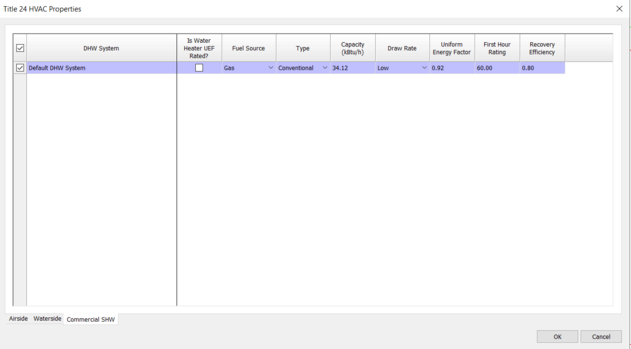
When the “Fuel Source” is set to “Gas,” users will have to define the
a) Capacity (kBtu/h) is the size of the DHW system. This data will define the size of the DHW system. Note that for the proposed model the auto sizing, i.e. “ApacheHVAC Room and HVAC Zone loads” and “ApacheHVAC System and sizing” calculation does not overwrite this user-entered value.
b) Draw Rate is based on the First Hour Rating (FHR).
Options are Very Small (for FHR 0-18 gal/hr), Low (for FHR 18-51 gal/hr), Medium (for FHR 51-75 gal/hr), High (for FHR >75 gal/hr)
c) Uniform Energy Factor defines an efficiency level for a specific targeted use pattern.
d) First Hour Rating is a measure of the overall capacity of the water heater that incorporates both the heat input rate and the tank storage capacity and is used to determine the draw pattern.
e) Recovery Efficiency. The full load efficiency of a water heater at rated conditions is expressed as a dimensionless ratio of output over input.
Fuel Source set to Electricity:
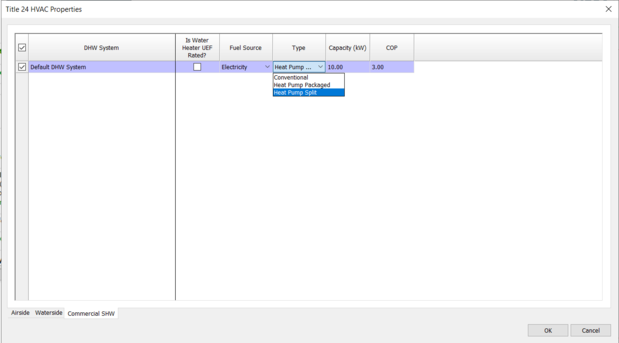
When the “Fuel Source” is set to “Electricity,” the user will have to define the
a) Type. User has the option to select either “Conventional,” “Heat Pump Packaged” or “Heat Pump Split.”
- If the user selects “Conventional” the other information the user will need to enter is the same as the “Gas” Fuel Source. Note that selecting the “Conventional” Type of “Electricity” fuel type will assign a resistance heating (“Generic Heating Source” in ApcheHVAC) as a heating source to the DHW system.
- If the user selects “Heat Pump Packaged” or “Heat Pump Split” then the user will need to define just the
i. Capacity and
ii. COP of the Heat pumps.
After making these selections, VE will automatically create the DHW system with the appropriate heating source. The DHW system can be checked in ApacheHVAC.
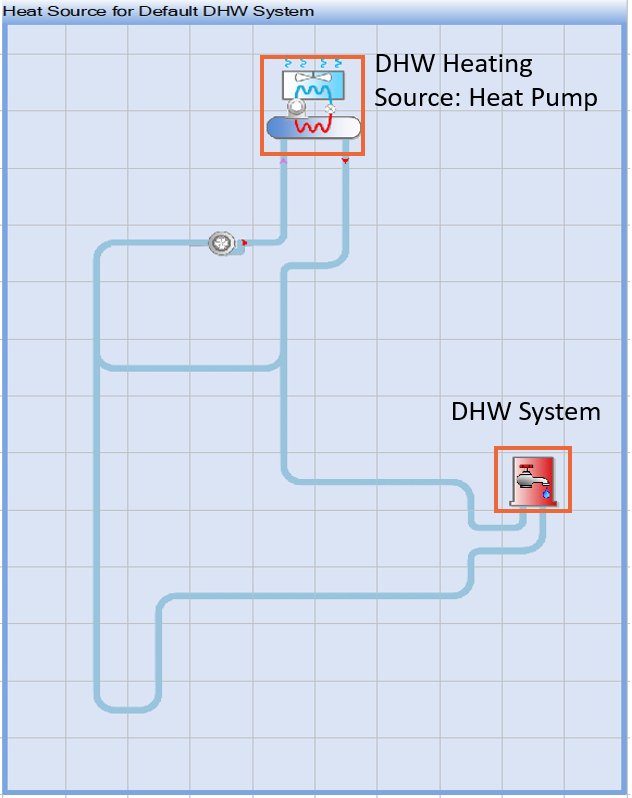
As an example, below is the image of the proposed model with a Heat Pump set as a heating source. Note that VE will generate a heating source in the HWL (as shown in the screenshot below) only when “Heat Pump Packaged” or “Heat Pump Split,” is selected as a “Type” for “Electricity” “Fuel Type.” If “Gas” or “Conventional” is selected for the “Electricity” “Fuel Source” the VE will select an appropriate heating source from the “Generic Heating Source” for the DHW system.
Standard Model
Auto-generated by VE based on Section 5.4.10 (Water heating Use) of Title 24 ACM. VE will then assign the “Electric source DHW” zone group to an “Electric” heating source and assign the “Gas source DHW” zone group to a “Gas” heating source.
The VE will automatically calculate the size of the DHW system based on the Subsection “Rated Capacity” of Section 5.9 (Miscellaneous Energy Uses) of the Title 24 ACM ruleset.