An optional step in the Navigator, but recommended for working with larger models and for HVAC.
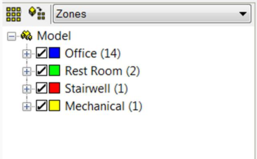
The Room browser below the navigator allows the grouping of rooms in categories. These categories can be created manually, or various pre-configured categories can be selected using the ‘Room Group Creator…’ entry in the main <VE> menu bar.
Using the first icon (circled in red in the caption on the left) in the Room Browser window you can add and remove room schemes, and control the grouping within each scheme. Using the second button (circled in blue in the caption on the left), you can assign the currently selected zone(s) to the active scheme / group. You can switch room group schemes using the drop-down selector.
For ease of room assignment to Multiplexes in HVAC, it is recommended that rooms be grouped together in an HVAC grouping scheme. A multiplex can then be assigned to a room group, automatically associating all rooms in the room group to the multiplex.