Select all appropriate zones that you wish to configure as obstructions prior to selecting this action.
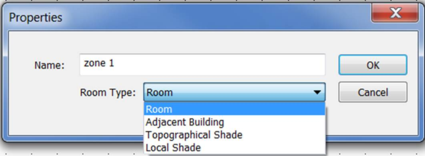
This Navigator action shows a dialog which changes the selected zones to one of the following room types:
· Room
· Adjacent Building
· Topographical Shade
· Local Shade
Local shades are shades associated to the building itself. They will be taken in account for the proposed building ETTV computation, as well as energy modelling for the proposed model; however, they will be removed from the reference building ETTV computation as well as energy modelling for the reference model.
As for topographical shades, or adjacent buildings, they will not be accounted for in the ETTV calculation, for both the proposed and reference building. However, there impact on the building energy consumption will be taken in account in both the proposed and reference model (if chosen by the user).
It is then advised to think carefully while selecting a shade as either a local shade or a topographical shade/Adjacent building.