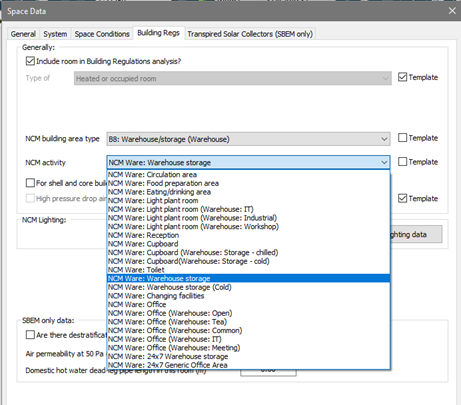
2.4.8.2 Building Regs tab
This tab is only displayed in VE Compliance. Some of the fields can be set in the Room Template. Others appear only in the VE Compliance Room Data and can be set on individual or group basis, or via Tabular Room Data.
The check box Include room in Building Regs analysis? is shown when a room is queried or selected whilst in VE Compliance allows you to restrict the Part L analysis to part of the building only.
The Type of room attribute is normally set to ‘Heated room’, but the following alternative settings are provided to cover various types of unheated space:
· Unheated roof – use this type for an unheated roof space lying outside the insulated building envelope (i.e. where the insulation is at ceiling level).
· Glazing cavity (required only rarely) – use this type for a glazing cavity that has been modelled as a separate room for simulation purposes.
· Other buffer space – use this type for other types of unheated space attached to the building but lying outside the insulated building envelope. Examples are car parks and lean-to outbuildings.
· Internal void or warm roof – for SBEM this is not applicable, users should refer to
SBEM guidance on zoning and consider these spaces as indirectly conditioned zones as described in BRE FAQs and documentation.
In the case of the first three types listed above – all representing types of unheated buffer space – an external ventilation rate must also be entered for the purpose of calculating U values. All the above types of room are excluded from the floor area summation upon which the emission ratings are based but will affect the wall adjacency used by SBEM when considering the conditions of the adjacent heated or occupied rooms that are included in the analysis. All the above types of unheated space are excluded from the floor area summation upon which the emission ratings are based.
The settings NCM Building area type and NCM Activity together specify the activity assigned to the room for the compliance analysis, which in turn (via the NCM Template) sets the standard conditions applied for occupancy and plant operation. While these attributes are optional in the Room Template, it is a good idea to set them there to save effort in VE Compliance.
For shell and core building, room is part of core area? relates to the special rules applying to shell and core buildings, rooms belonging to the shell area being treated differently from those belonging to the core area. This box is used (where applicable) to make this distinction.
High pressure drop air treatment does not apply to Part L2 (2021).
NCM lighting data opens the NCM lighting data dialog.