15.6. BRE 209 Appendix G illuminance processing & results:
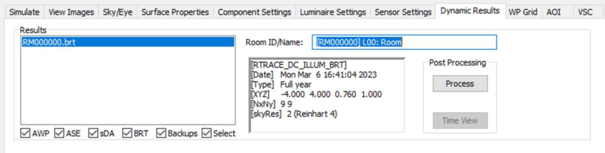
Two annual DA simulations (summer & winter MAP settings) will be carried out and are saved in a single .BRT file which will be shown on the RadianceIES > Dynamic results tab.
The BRT file requires post-processing for BR 209 Appendix G; click on the RadianceIES > Dynamic results tab, select the file and click on the Process button.
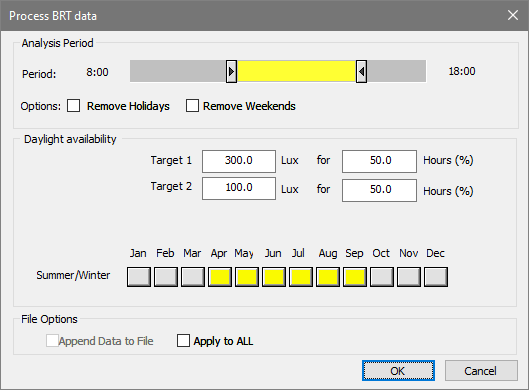
A process BRT file dialog will be shown:
Select period settings;
Set Daylight availability lux thresholds and fraction of daylight hours as BS EN 17037 (table A1 & A2);
Set which months are defined as summer months for the foliage species as BRE Digest 350 (Fig 17);
To batch process rooms check apply to all;
Click on OK.
The BRT file will be processed; this combines the results according to the summer/winter month setting and carries out the threshold assessment. On completion a WPD results file will be available in the WP Grid tab.
Select the WPD file; a set of the processed results are provided. For BR 209 Appendix G assessment the two entries [BRT] > *** lux > **% hours (hh:mm – hh:mm) need to be checked for the fraction of space for target level or fraction of space for minimum target level as indicated in BS EN 17037 table A1 or A2:
Determine the fraction of space for target level or fraction of space for minimum target level as BS EN 17037 for the space;
Drop down one level of decomposition in the viewer (space);
Set AOI;
Select the target result ([BRT] > *** lux > **% hours (hh:mm – hh:mm));
Check % area meeting the test versus the target level;
Select the minimum target result ([BRT] > *** lux > **% hours (hh:mm – hh:mm));
Check % area meeting the test versus the minimum target level;