Once you have assigned and finalised Passivent Roof Terminals to rooms in your model, the model should be ready to simulate.
You can choose to manually run pre-thermal simulations, such as Suncast (a link is provided on the Navigator) or set these to run automatically by setting them ON with the Apache simulation dialog.
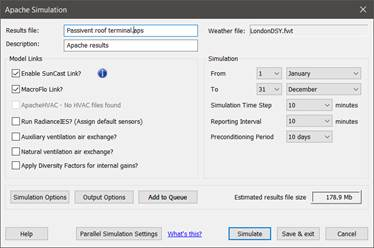
Clicking the SimulateSystem action under Thermal Simulation will switch to Apache view and display the Apache Simulation dialog.
Fig 11: Apache sim sim options
In order to effectively simulate and view results for the Passivent Roof Terminals, the following simulation options are required:
- Enable SunCast Link? should be active if this has not already been generated manually.
- MacroFlo Link? should be active.
- Auxiliary ventilation air exchange? should be active.
- Natural ventilation air exchange? should be active.
- From / to? 1 Jan to 31 Dec.
- Simulation timestep? set to 10 mins (required for BB101:2018 CO2 checks).
- Reporting timestep? set to 10 mins (required for BB101:2018 CO2 checks).
Once ready, you can start the simulation by clicking the Simulate button.
Once completed, the VE should switch to VistaPro for viewing and analysing the results.