More information about Radiance can be found in the book “Rendering with Radiance” by Greg Ward Larson & Rob Shakespeare, published by Morgan Kaufmann Publishers.
Radiance is a software package developed by the Lighting Systems Research group at the Lawrence Berkeley Laboratory in California, USA. Radiance was developed as a research tool for predicting the distribution of visible radiation in illuminated spaces. It takes as input a three-dimensional geometric model of the physical environment, and produces a map of spectral radiance values in a “photo-realistic” colour image. It can be used to calculate lighting levels (LUX), Daylight Factors or Glare for daylight and/or artificial lighting.
Radiance is internationally recognised as one of the leading lighting simulation tools available. IES have been using Radiance over a wide range of commercial projects for many years and to facilitate this work IES have integrated Radiance into the <Virtual Environment>. The latest version of this integration, RadianceIES, provides users with even greater ease of use through its customised Graphical User Interface (known as the <Virtual Environment> Framework), which integrates with all the other IES software packages (SunCast, Apache, etc.).
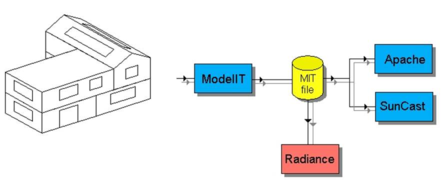
The Radiance interface module RadianceIES is integrated into the Virtual Environment Framework. This means a greater degree of compatibility between the various modules and more natural interfaces for the user to navigate. From a conceptual point of view the RadianceIES interface can be treated as a stand-alone module (as shown below). A more detailed description of the RadianceIES interface is described in the chapter “The RadianceIES Interface”. The following figure shows the mechanism that has been adopted as an efficient and effective way to control the manipulation of the necessary data and the creation of images.
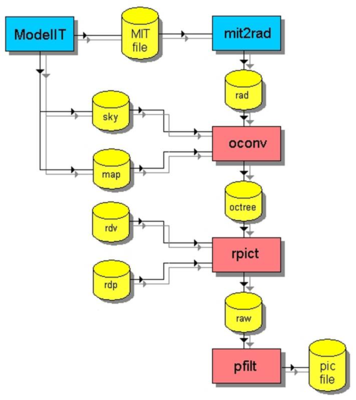
The 3D geometry of the model created by ModelIT is converted by an internal module (mit2rad) which is hidden to the user. Global properties are inherited from the ModelIT database e.g. site data, and default properties are assumed for other data requirements e.g. surface colours, etc. This information is written into three data files – the sky file, the map file and the rad file. In RadianceIES the user may manipulate the specific properties that are required. These 3 data files are required by the program oconv, which uses these data files to create the octree file. There are two types of picture file created by Radiance, luminance and illuminance. An illuminance picture can be used to look at Lux values and generate Lux or DF contours, a luminance picture can be used to generate glare indices or as a photo-realistic image. The interface program RadianceIES allows the user to create the two data files, the view file (*.rdv) and the parameter file (*.rdp), that control the image generation program, rpict. The raw image file is filtered and scaled by the program pfilt to create the picture file (*.pic). The interface is designed to make things as easy as possible for the user to create images by making default assumptions where possible.
Radiance can be categorised as a “ray-tracing” algorithm, which tracks rays of light backwards from the “eye” and into the “scene”. This contrasts with the “radiosity” technique where the exchange of energy between surface patches is calculated.
Components
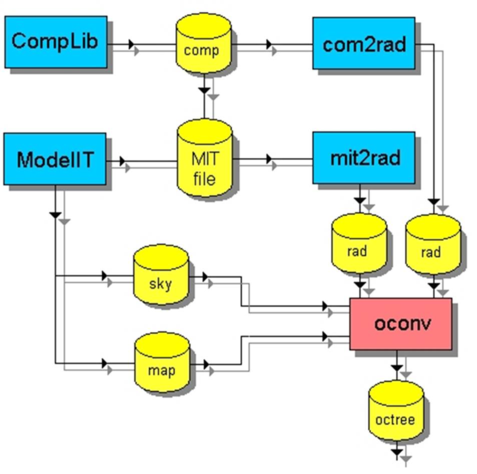
The Component Modeller can be used to add components (3D objects used to represent elements within a zone, e.g. desks, chairs, people, etc.) into the model. The relationship between RadianceIES and the Component Modeller is as follows:
The Component Modeller updates the model with the user defined components from the component library (components may be imported from standard libraries or other projects). These are filtered by an internal module (com2rad) and input to the Radiance module oconv. Subsequent steps in the process are the same as the standard scenario.
Luminaires
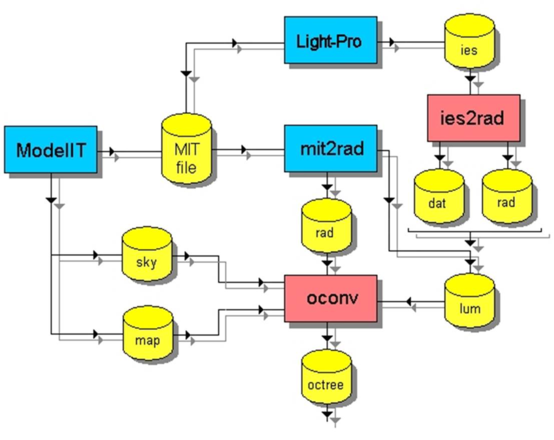
The module Light-Pro can be used to add luminaires into the model. The relationship between RadianceIES and Light-Pro is as follows:
Light-Pro updates the model with the luminaire data selected by the user from a database. The selected luminaires are converted to the IESNA data format, which are then converted by the program ies2rad into a format usable by Radiance (*.rad and *.dat). An extra input file (*.lum) is added to the oconv input stream, which defines the luminaries, which are active in this simulation. If no daylight is required for this simulation then the sky file is omitted from the input stream. Subsequent steps in the process are the same as in a normal daylight simulation.