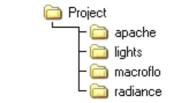
One problem with running multiple applications or multiple simulations is keeping track of all the required data files. It is strongly recommended that a specific project directory be created for each model even where one model may be a variation on another. This allows the sub-directories (or folders), which are automatically created by ModelIT, to be unique to the particular model and avoids confusion between data files. All files associated with the Radiance view of this project - picture files, octree files, etc. are stored in the “Radiance” sub-directory, and is the default location when looking for files.
A description of the use and contents of each of these file types follows in the next chapter. Files which use the root project name are used as default instances of the file type when creating images interactively, e.g. for the project “office.mit”, the files “office.map”, “office.rdv”, “office.rdp”, etc., are all created with default settings and are updated automatically when the relevant tabs are updated.
The master file is the “*.mit” file which is located at the “Project” directory level. This file contains the 3D description of the model and other information relevant to the model. It is a binary file and can only be accessed through the ModelIT framework and the applications which run under the framework i.e. RadianceIES. Also at this level is the Component Library file, the “*.mcl” file (it is possible to access components from other models). Certain other files store information which is used by Radiance and other applications, these are summarised in the table below.
*.mtd
ModelIT template file.
*.mcl
Component Library file.
Apache\*.df
Detailed constructions.
Apache\*.loc
Location file.
Apache\*.mat
Material definitions.
Apache\*.pdb
Profile descriptions.
Apache\*.pro
Profile group descriptions.
Apache\*.wea
Weather file.
Note that when a model has to be transferred all these files are required. To help with this there is an “Archive” option in the main <VE> pull-down menu which allows the user to create a single compressed file of all the required model data. This is also the most efficient way for sending models by e-mail.