Step Functions (greater or less than)
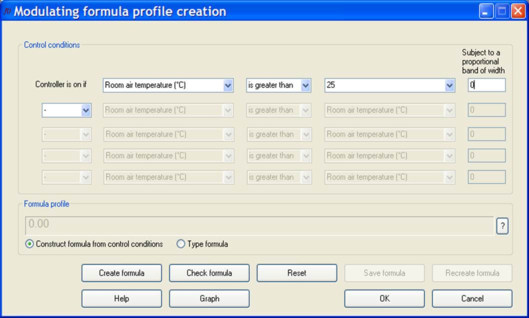
If you need a controller to open a window when the room air temperature exceeds 25°C you should select “Room air temperature (°C)” from the first drop down list, “is greater than” from the second drop down list, and type the value “25” into the third drop down list.
The dialog will then look like this:
If you now click on the Create formula button you will see the formula “ta>25” appear in the Formula profile box. This formula is the mathematical expression of the control condition, and it will be written in the appropriate row of the daily profile. Note that if IP units were selected the units shown in the drop down lists would be shown as IP units. Numerical values can only be entered into the second drop down box.
Suppose now that you need a formula to trigger a control action when the room temperature drops below 15°C, for example switching on an auxiliary heater defined as an internal gain. (It’s worth emphasising that a formula such as this is not required for the main room heating control, which is managed in a straightforward way with the room heating set point.)
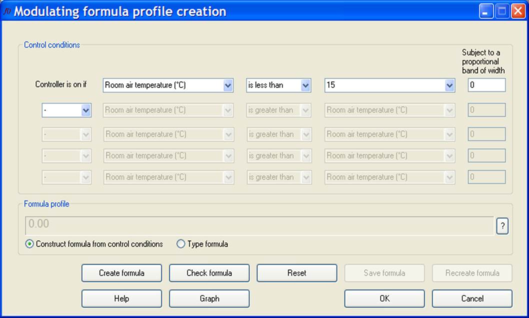
For this the second drop down box would need to be changed to “is less than” and the value 15 input into the third drop down list.
The dialog will then look like this:
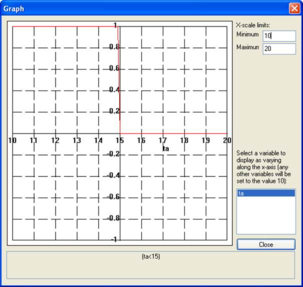
By pressing the Create formula button you will now see “(ta<15)” in the Formula profile box. By clicking on Graph you can display the formula graphically, as follows:
The graph shows a value of 1 (ON) below 15 °C and a value of 0 (OFF) above 15 °C. You may use the X-scale limits to set the minimum and maximum values displayed along the x-axis. Note that in cases where the formula contains more than one variable, the Graph facility plots the formula as a function of one variable and set all the others to the value 10.
Ramp Functions
The previous two examples, “ta>25” and “ta<15”, are step function formulae. To create a control action across a range of values – a proportional band – a value must be entered in the box headed “Subject to a proportional band of”. Again this is best described by example. To specify a control action that starts to open a window at 23°C and modulates the degree of opening linearly until it is fully open at 27°C you should proceed as follows:
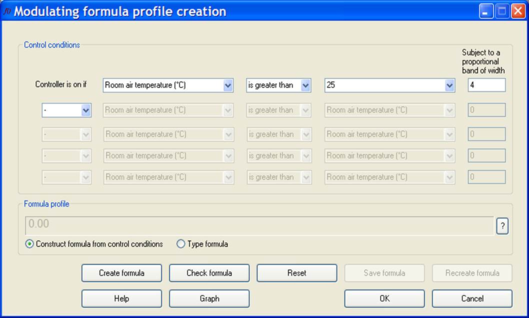
Select “Room air temperature (°C)” from the first drop down list, “is greater than” from the second drop down list, then type the value “25” into the third drop down list (specifying the centre of the proportional band) and the value 4 into the “Subject to a proportional band of width” box.
The dialog will then look like this:
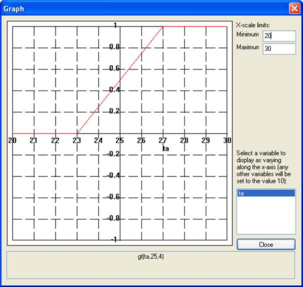
If you now click on the Create formula button you will see the formula “gt(ta,25,4)” appear in the Formula profile box. The gt() function is a ‘fuzzy’ version of the “greater than” step function, its third argument indicating the proportional bandwidth. By clicking on the Graph button you can display a graph of the control characteristic:
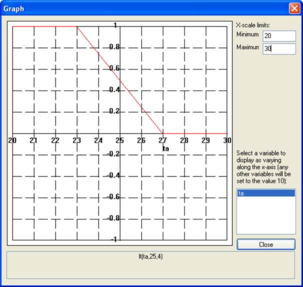
Here you can see the upward ramp function. By choosing “is less than” a downward ramp function can be created:
Proportional bands give a smoother type of control than step functions, and are usually a better representation of real controls.
>: Insert description text here... And don't forget to add keyword for this topic