To properly display this page you need a browser with JavaScript support.
Download
|
Support
|
Training
|
Login/Register
Software
Consulting
Research
Discoveries
×
Menu
Index
Search
Search
Search
6. Data visualisation and reports
6.2. Report Generating Tool:
6.2.1. Model-level reports, Boundary-level report & Time
6.2.1.1. Model level reports
Previous page
Next page
To properly display this page you need a browser with JavaScript support.
6.2.1.1. Model level reports
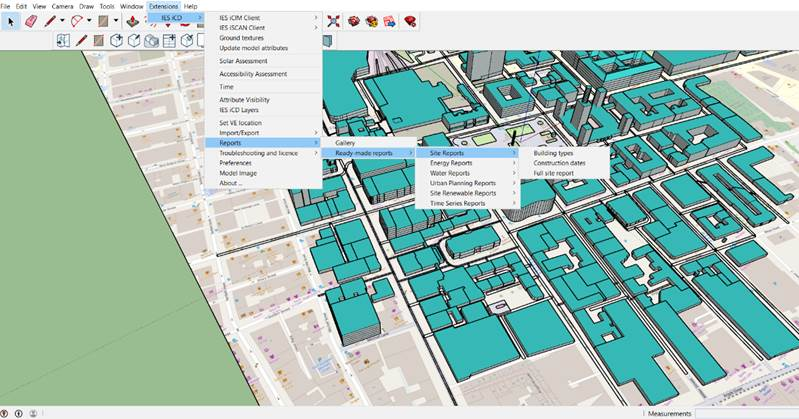
Default Reports store all the urban/energy data for the entire iCD model. A standardised approach to view the default reports are as follows:
Extensions < IES iCD < Reports < Gallery or Ready-made Reports.
The Gallery/ready-made consists of individual data reports
(such as site, energy,water etc)
in a template which can be viewed and saved as a PNG file by the user.
Figure
6-3
Model Level Reports using IES iCD extension
The online help was made with Dr.Explain