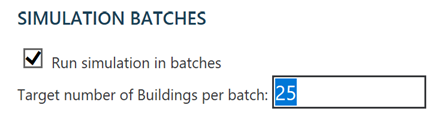
Simulations can now be run in batches. This means that the user can specify the amount of buildings to simulated in one group.
This functionality can be particularly useful when simulating a large number of buildings: with this functionality, the simulation can be broken down into smaller batches preventing potential simulation failure to impact the entire model and only the batch the failure happened on. The other batch will simulate even if one batch fails
To simulate your model in batches the user can go to the simulation launcher > Simulation Batches > Tick the Run simulation in batches tickbox > select the maximum number of building each batch will contain.
In the example below the selection will be simulated by groups of 25 buildings until the all selection is simulated
Note: If users come across an error during the simulation run it is possible that some batched will have already been simulated until the ICD has encountered the problematic building.