Customise (custom model attributes) is used to create additional attributes that might be needed for the model (specific available data that are).
Example: In some cases, the user may have very important information for specific iCD buildings including Electricity & Gas Consumption Data’s, HVAC Data’s, Boiler’s Energy, Building Operational Cost etc. This available information can be incorporated to the corresponding buildings by creating new attributes using the customise option as explained below.
Steps to create attributes in the customise option are as follows:
1. Select customise from the iCD toolbar.
2. From the Custom Model Attributes window, select AddAttribute option.
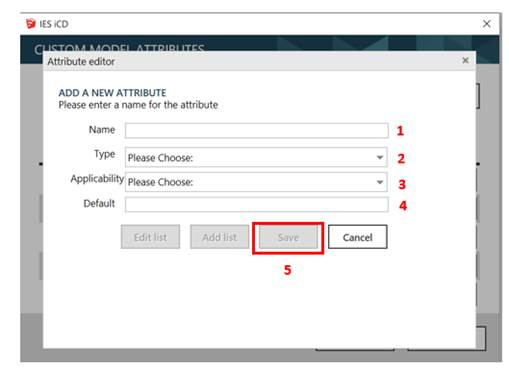
3. Enter the Name of the Attribute (1) and choose the attribute’s type (2) from the list available based on user’s choice (text, list, integer, true or false or number)
4. Select the Applicability of the attribute (3) (whether it applies to All objects, Buildings only, Floor planes only, Rooms only, Landscaping or Shade). The created new attribute will be applied only to the selected type.
5. Then select the default value (4) of the attribute before saving (5).
Figure4-59Attribute Editor – Add New Custom Attribute
Note:Users can add any number of attributes to the iCD model. These attributes can be edited or deleted at later stage based on the model requirements.


 from the iCD toolbar.