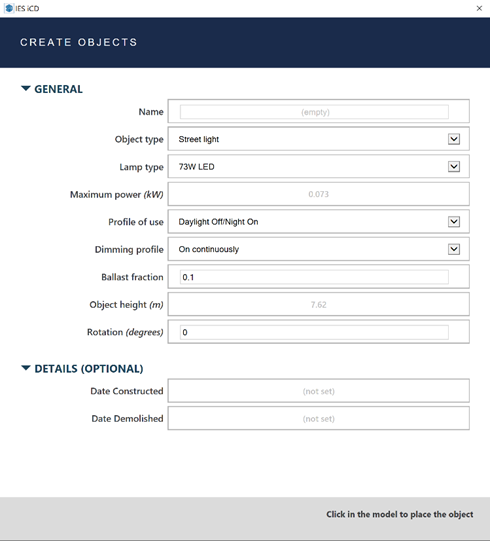
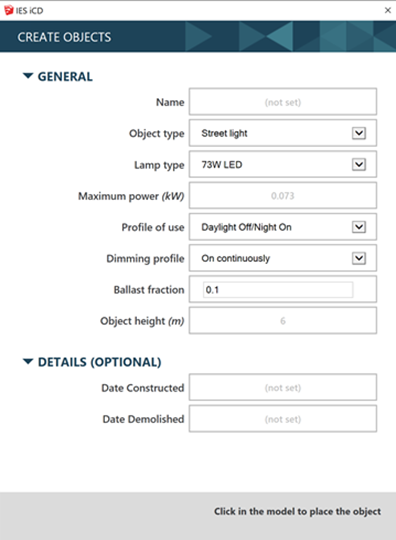
Select Create option < select Street light from Object type.
Create option from the iCD toolbar can be used to add Street Lights to the model. The following attributes can be set for street lights:
·Lamp type: Allows the user to select from four pre-set types of street light: 73W LED, 250W High Pressure Sodium, 400W Metal Halide and 1000W High Pressure Sodium.
·Maximum Power: Determines the maximum power consumption of the street light. Will have a default value set by the lamp type which can be overwritten by the user.
·Profile of use: Specifies the operational profile of the street light. There are five options Daylight on/Night off, Daylight off/Night on, on continuously, off continuously and Office hours on.
·Dimming profile: Specifies the operational profile of the dimming function of the street light, if any. The same profiles are available as for the profile of use attribute.
·Ballast Fraction: Specifies the ballast efficiency of the streetlight which gives an indication of what percentage of light produced is lost in the lamp casing.
·Object Height: Determines the height of the street light, there is a default value of 6m/25ft.
Rotation (degrees):Orientation of the tree to the north (0°= north).
·Date Constructed: Specifies the year the street light was constructed
·Date Demolished: Specifies when the street light was/will be removed from the site.
Note:Data painter tool can also be used to copy / paste the Street light’s attributes from one Street light to others (see4.9.13DATA PAINTER).
Note: Street lights can be duplicated just as PV panels (see 4.10.2Duplicate PV PANELS).


 from the iCD toolbar can be used to add Street Lights to the model. The following attributes can be set for street lights: