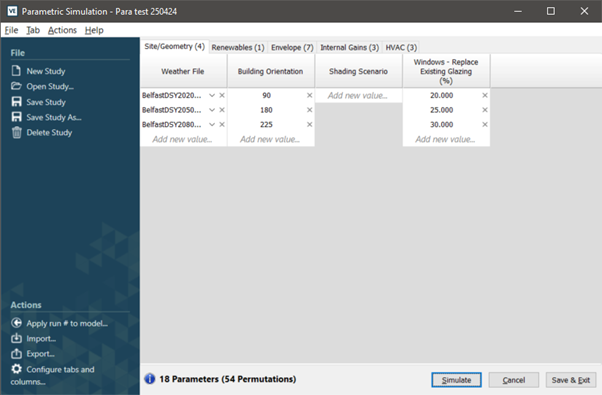
The Parametric Tool uses the cartesian product of the entered parameters to define a set of unique ‘study’ models for parametric analysis. As a result, the number of permutations to simulate can quickly grow as parameters and parameter values are added.
The number of parameters and permutations are shown in bold on the main Parametric Tool dialog bottom bar:
Figure: Number of parameters and permutations
Users should consider the number of permutations before proceeding with simulation as a large number of permutations will impact the time required for parametric simulation, increasing with model size and complexity (ApHVAC, KIVA etc).
As a rough guide:
• Up to 1,000 permutations - is normal.
• Greater than 1,000 permutations - consider refining the analysis / resolution.
To avoid carrying out unnecessary and time-consuming simulations consider:
• In early-stage design:
o Be clear on your goals.
o Consider public domain benchmark data if you are setting an energy target.
o Look at energy or carbon end-uses to understand which end-uses are the largest and thus what variables are most likely to be the most sensitive.
o Use separate parametric studies on key design aspects to better understand parameter sensitivity and to refine parameter value range.
o Concentrate on the most sensitive parameters.
o Limit the number of parameter values to milestone values.
o Consider a coarse simulation resolution.
o Consider not using ApHVAC, KIVA etc. at this stage, i.e. concentrate on loads not plant.
• In detail-stage design:
o Avoid conflating uncertainty with sensitivity analysis e.g. the impact of varying occupancy or weather. Sensitivity studies are typically carried out on a design strategy or risk assessment.
o Consider coarse then more focused parametric studies.
o Limit the number of parameter values to considered values (don’t throw the kitchen sink at it).