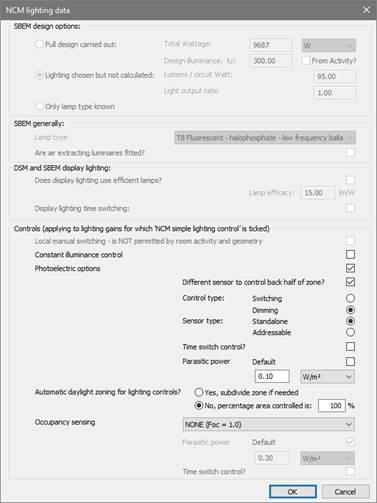
This dialog defines lighting the characteristics of control measures which are to be modelled using the NCM Simple Lighting Control method.
This dialog is shared between the ApacheSim and SBEM based ratings frameworks. The following description is limited to the settings applicable to ApacheSim (the controls frame).
Controls (applying to lighting gains for which ‘NCM simple lighting control’ is ticked)
Local manual switching
When permitted by the NCM rules, local manual switching may be selected by ticking this box.
Constant illuminance control
Ticking this box causes an allowance to be made for constant illuminance control, reducing lighting energy.
Photoelectric options
Ticking this box simulates photoelectric control of lighting in response to daylight.
Different sensor to control back half of zone?
Ticking this box improves the quality of photoelectric control by adding a second sensor.
Control type
Select ‘Switching’ or ‘Dimming’.
Sensor type
Select ‘Standalone’ or ‘Addressable’
Time switch control?
Tick the box to turn off parasitic power at times when the lighting profiles are off.
Parasitic power
Set the parasitic power value in W/m2. Parasitic power set with this parameter applies to both photoelectric and constant illuminance control.
Automatic daylight zoning for lighting controls
Select the approach required; sub-divide or percentage area controlled.
Occupancy sensing
Select from options specifying combinations of manual and automatic occupancy sensing control.
Parasitic power
Set the parasitic power value for occupancy sensing control in W/m2.
Time switch control?
Tick this box to turn off parasitic power at times when the lighting profiles are off.