Inserting a Passivent Roof Ventilation Terminal (with low level inlets) into a Room
For these components the same workflow as Roof Terminals (without low level inlets) is followed up to step 16; however, these products work in conjunction with room louvres and windows which need to be defined before the placement is finalised.
16. In the views check you are satisfied with the terminal position in all planes.
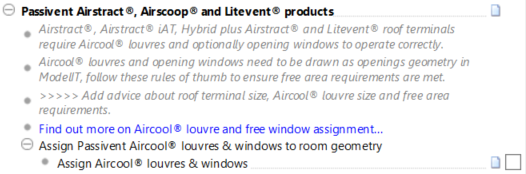
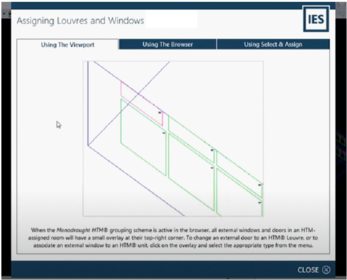
17. Select Assign Aircool® louvres and windows, a dialog will be displayed to explain the process of defining the window and louvres for automatic data assignment.
18. Pick the route you wish to utilise.
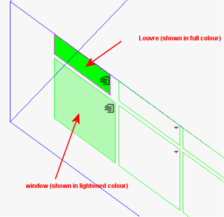
19. For the viewport route click on the triangular icon on each room opening and set the required assignment i.e. an active louvre or window under control as part of the roof terminal system.
20. In the Navigator section ‘Validate Roof Terminal assignments’ select Ensure that all rooms assigned Passivent Roof Terminals and louvres are valid. This will check the assignments are valid / none are missing. A dialog will appear confirming the validation or indicating what is wrong and needs correcting before Finalize can be executed.
21 .If valid now press Finalise roof terminals. The VE now cuts or fixes the component into the model geometry and applies data changes to the room. You will notice that target surfaces and any surfaces in spaces through which the component passes are split in two; this ensures ‘island’ surfaces are not created.
The act of finalising a Passivent Roof Terminal makes a number of room data modifications.
The following modifications are made to the Room Data for the room:
- The Heating Setpoint profile will be updated with the component instance setpoint value.
- The Cooling Setpoint profile will be updated with the component instance setpoint value.
- The Component operational profiles will be updated with the component instance setpoint values for heating, night cool, CO2 and mechanical cooling (Airscoop® mixed mode only).
The following modifications are made to the associated windows and doors:
- Operational profiles for MacroFlo assignments for any associated external doors (louvres) and windows will be updated.
The following modifications are made to the ApHVAC network data for the room room (Passivent Airstract® iAT and Passivent Hybrid Plus Airstract® only):
- The HVAC component operational profiles will be updated with the component instance setpoint values for heating, night cool and CO2.