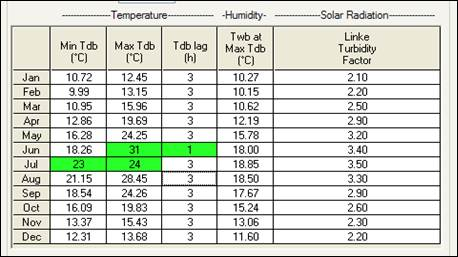
Custom weather files can be created by modifying the individual values of existing files. Once modified the data values turn a green colour to indicate that a change has been made. To do this, for the parameters common to both CIBSE and ASHRAE for each month from January to December inclusive, the following data are required:
Min Tdb - Minimum Daily Dry-Bulb Temperature.
Max Tdb - Maximum Daily Dry-Bulb Temperature.
Tdb lag - Dry-Bulb Time Lag – enter the lag in hours with respect to 12 noon (excluding any local time correction) at the standard time meridian. For example, if you type in 3, here, the dry bulb temperature will peak at 15:00 GMT (or at 16:00 if 1 hour summertime correction is in operation).
Twb at Max Tdb - Daily Wet-Bulb Temperature at Maximum Dry-Bulb Temperature.
For a CIBSE analysis, the following additional parameter is required:
Linke Turbidity Factor - describes the combined impacts of various atmospheric factors on the solar beam transmittance – refer to CIBSE Guide Part J Weather, solar and illuminance data for a complete description of this factor.
For an ASHRAE analysis, the following additional parameters are required
Solar radiation parameter A
Solar radiation parameter B
Solar radiation parameter C (ratio of diffuse horizontal to direct normal irradiation):
Parameters A and B are used in the following expression to determine direct normal irradiance:
direct normal irradiance = A * exp( - B / sin (solar altitude))
Please refer to the Climate Design Information section of ASHRAE Fundamentals for a detailed description of these solar radiation parameters.
This data must be entered for 12 months of the year (if you are only interested in summer conditions, leave the winter data in its default state). ApLocate uses this data to generate sinusoidally varying weather data for input to the CIBSE and ASHRAE Heat Gain calculations.