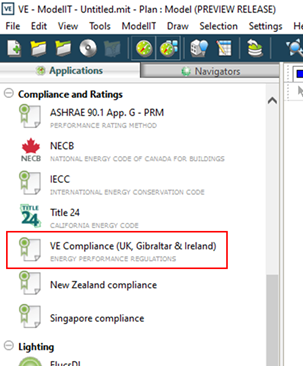
The Gibraltar Part F (2007) DSM compliance tool is accessible via the ‘Compliance and Ratings’ applications group within the IESVE. Selection of the ‘VE Compliance (UK, Gibraltar & Ireland)’ directs the user to VE Compliance section of the IES Virtual Environment (VE).
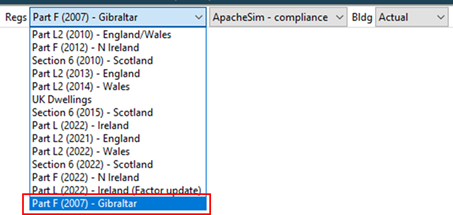
The ‘Part F (2007) – Gibraltar’ field is displayed within the regulation’s framework.
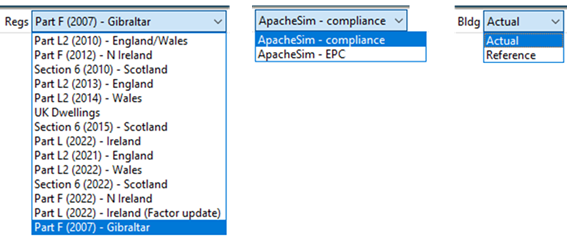
The user can select between the following Regulation types:
ApacheSim – Compliance
ApacheSim - EPC
Note:
ApacheSim – Compliance --> maps to the iSBEMgi_v4.2.a > Building Rules Part F only.
ApacheSim – EPC --> maps to the iSBEMgi_v4.2.a > EPC only.
Other user selections are covered via the Analysis section > Building data > Set Building & System Data [button].
For example:
Project category
Whole building
Extension to existing building
Project class
Non-dwelling
Dwelling
Stage of analysis
As built
As designed
Naming conventions for Project category and class align with iSBEMgi_v4.2.a user interface (UI), and map to the Gibraltar 2024 National Calculation Methodology (NCM) modelling guide in the following way:
Gibraltar 2024 NCM modelling guide
Project Category
Project Class
New dwelling
Whole building
Dwelling
Extension to existing dwelling
Extension to existing building
Dwelling
New non-dwelling
Whole building
Non-dwelling
Extension to existing non-dwelling
Extension to existing building
Non-dwelling
Gibraltar 2024 NCM modelling guide
Project Category
Project Class
The user can also select the Building type:
Actual
Reference --> Generates the reference building from the actual building according to rules laid down in the Gibraltar 2024 NCM modelling guide.
Below is an overview of the above selections. Refer to sections below for further details.