The Eye view position is the point from which the image is taken (i.e. where a camera would be placed).
The Focus view position sets the point towards which the camera would be directed.
There are three ways to select the point of view:
·by double right-clicking the mouse on the new eye or focus position in plan/elevation view and choosing Set Eye/Focus Position option
·by changing the x, y and z values in the Eye and Focus view position boxes
·by clicking on the Get Position button (in the View Parameters sub-group).
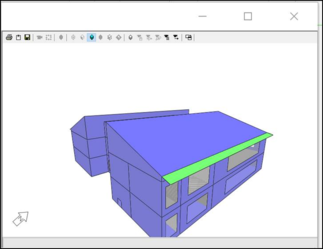
After clicking on Get Position, a Model Viewer window will appear:
Use the following keys to set the eye position:
·W (zoom in)
·S (zoom out)
·A (left)
·D (right)
·E (up)
·C (down)
Then use the left mouse button to define the view.
Once the required view is set, close the Model Viewer window.
The default generated view adds 10% to the bounding box of the defined view and sets the focus position to the centre of the defined view. If a zone is selected, then the eye and focus position change to inside the zone.
If the Lock checkboxes next to the eye/focus position coordinate boxes are ticked, the eye/focus positions cannot be accidentally moved.