4.6.2 Create Process Loads
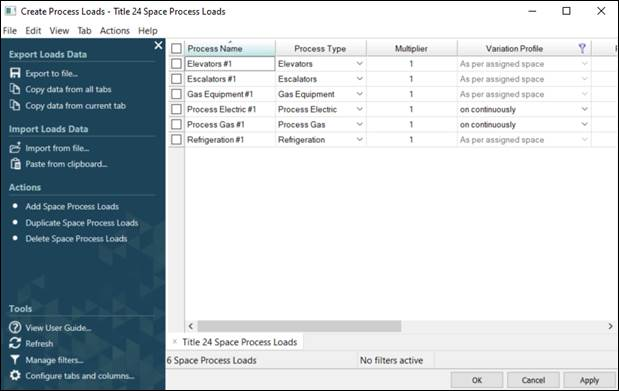
This option opens the Tabular Space Data to create the process loads in a project as below
Create Process loads
By default, 6 different process loads are created (but not assigned) in a project. These can be seen in the list of space process loads as shown above. A user can assign and edit these process loads or add additional process loads.
Note that certain properties of the process loads are set by the standard e.g. the power associated with elevators and escalators, the variation profile, etc.
To add additional process loads, a user is required to “Add Space Process Loads” from the actions tab highlighted above.
Process loads in each space utilizes the following inputs:
· Process Name: User-defined input for Process load
· Process Type (dropdown): Type of process load. Options include: Process Electric, Process Gas, Refrigeration, Gas Equipment, Elevators & Escalators (Description provided in next section)
· Multiplier: Multiplier applied to specific process load.
· Variation Profile: Equipment schedule reference
· Power: The total installed power consumed by the process load
· Radiant Fraction: The fraction of radiant heat gain to a space based on appliance energy use. Fraction convective (sensible) is typically equal to 1.0 minus fraction radiant, minus fraction latent, minus fraction lost
· Latent Gain: The fraction of latent heat gain to a space based on appliance energy use. Fraction convective (sensible) is typically equal to 1.0 minus fraction radiant minus fraction latent, minus fraction lost
· Lost Fraction: The fraction of heat lost to the exterior is based on appliance energy use