Navigators are a feature in the IES-VE to allow guidance on particular workflows for setting up designs or carrying out complex analyses such as compliance. They also include shortcuts to features that are unique to those systems.
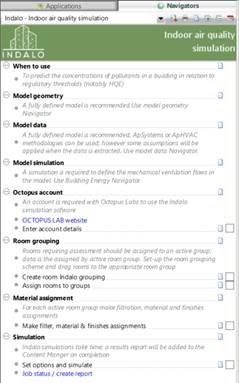
The Indalo® navigator can be found by accessing the Navigators panel and selecting “Partners-> Indalo® Indoor Air Quality Simulation” from the dropdown at the top of the panel. Fig. 6 shows the Indalo® navigator panel.
By selecting different options in the Navigator, shortcuts to parts of the IES-VE can be accessed. For example, clicking on “Material assignment” will open a dialog that allows the user to assign materials from the current Indalo® dataset to model surfaces. Using these shortcuts is a good way of making sure that all required steps for preparing a VE model for Indalo® simulation are made and in the correct order.
Note that some of the options will be greyed out until check marks are made on the boxes on the right-hand side. This is to help ensure that necessary previous steps are made before certain shortcuts are available. In addition, user notes can be added regarding each step by clicking the page icon by each entry.
Fig 6: The Indalo® navigator. The navigator features a step-by-step workflow to prepare a VE model for Indalo® simulation.