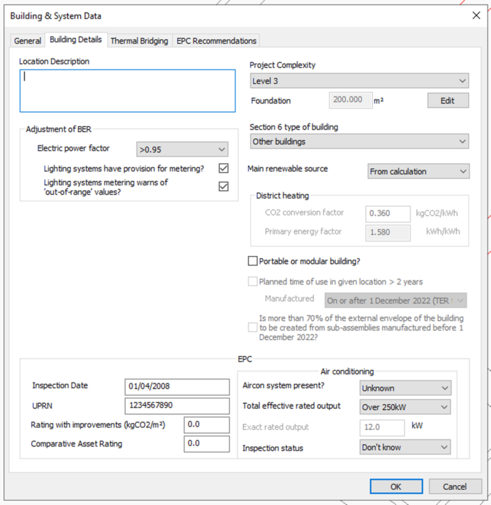
This tab allows for the input of data used in ratings analysis common to the two types of ratings analysis, and certain additional information required for compliance or EPC generation. The screenshot below is for EPC generation. For compliance the format is mainly identical but lacks the ‘EPC’ section.
Location Description
Descriptive text may be entered here.
Adjustment for management features
These settings allow credit to be taken in the BER calculation for management features applied to electrical power and lighting:
· Electric power factor
· Lighting systems have provision for metering?
· Lighting systems metering warns of ‘out-of-range’ values?
Project Complexity
Set the project complexity according to official guidance.
Stage of analysis
Set whether the building is analysed ‘As designed’ or ‘As built’.
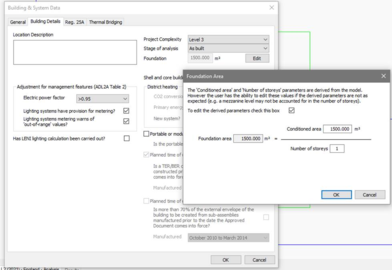
Foundation
Foundation area is utilized to set notional PV area; pressing the edit button displays an edit dialog where the area and # of storeys can be set. Default values are inferred from the model but these may not be accurate with certain geometries, so use inspection is required.
Shell and Core Building?
Tick this option to define building as a shell and core building (shell and core rooms as defined on Building regs tab of Room Data)
District Heating
This section is only active when a system with Heat source/fuel type set to District Heating is assigned to a room in the building.
District Heating CO2 Conversion Factor: Enter the CO2 Conversion Factor to be used by systems whose heat source/fuel type is District Heating.
Primary Energy factor: The conversion factor used to calculate the Primary Energy consumption associated with the District Heating system energy use.
The 2022 NCM modelling guide stipulated to enable application of the correct emission and primary energy conversion factors to the building, the person undertaking the calculation should be provided with a report, signed by a suitably qualified person, detailing how the emission factors and primary energy factors for the network have been derived.
Portable or Modular Building
Tick to define building as Portable or Modular and reveal ‘Planned time of use in given location’ and further related input options.
Portable or Modular Building
Tick to define the building as Portable or Modular and set the related inputs Planned time of use in given location and further related input options.
Has LENI lighting calculation been carried out? (compliance only)
Specifies whether a calculation following the Lighting Energy Numerical Indicator (LENI) method has been carried out for the building as an alternative to complying with the lighting efficacy standards as specified in the Non-Domestic Building Services Compliance Guide.
The following parameters apply to EPC analysis only
Inspection date (EPC only)
The date on which the energy assessor inspected the building for the purposes of energy calculations for the EPC.
Enter in the format dd/mm/yyyy
UPRN (EPC only)
The Unique Property Reference Number (UPRN) of the building (must be 12 digits).
Does the building have special conservation status?
Tick the box to indicate whether the building has a special conservation status (i.e. the building
has been identified as being: one of special architectural or historical interest, in a
conservation area, in a designated area of special character or appearance, or of traditional
construction).
Air Conditioning
Enter details of the air conditioning system in the building. Not used in calculations (HVAC data is defined in Apache systems/System Wizard) but instead used in EPC report.
Aircon system present? Specify if air conditioning system is present in the building (if applicable).
Total effective rated output: If actual output is known then choose ‘EXACT’ and enter value in ‘exact rated output’ input else choose dropdown option that matches estimated value.
Inspection status: Indicate whether an air conditioning inspection been commissioned for compliance with Energy Performance of Buildings Regulations.