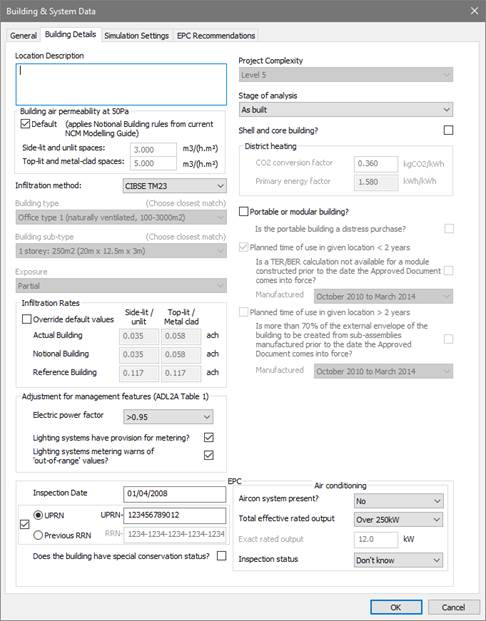
This tab allows for the input of data used in ratings analysis common to the two types of ratings analysis, and certain additional information required for compliance or EPC generation. The screenshot below is for EPC generation. For compliance the format is mainly identical but lacks the ‘EPC’ section and the question about LENI lighting analysis.
Note: When Wales is the active regulation mode, the dialog will contain an additional ‘Is mains gas supply available on site?’
Building air permeability at 50 Pa (m3/(m2.h))
Two values should be entered for building air permeability, for different categories of NCM activity: ‘Side-lit and unlit spaces’ and ‘Top-lit and metal-clad’ spaces. These space categories are subject to different permeabilities in the notional building, and may also optionally be treated differently in the actual building. The permabilities will be used to calculate infiltration rates for rooms in the actual building. Ticking the Default check box sets the values which apply in the notional building.
Infiltration method
Choose between alternative methods for the calculation of infiltration rates as a function of permeability: CIBSE Guide A and CIBSE TM23.
Building Type, Building sub-type, Exposure
These settings are inputs to the CIBSE Guide A method.
Choose the options that best describe the building. Infiltration rate settings will be updated accordingly.
Infiltration rates
Here are displayed the infiltration rates for the Actual and benchmark buildings calculated using the selected Infiltration method from the parameters above. The reference building has set permeability applied.
Tick Override default values to enter alternative values (if supported by suitable justification). If the actual building values are edited using this facility the notional and reference building values will be adjusted in proportion.
Adjustment for management features
These settings allow credit to be taken in the BER calculation for management features applied to electrical power and lighting.
· Electric power factor
· Lighting systems have provision for metering?
· Lighting systems metering warns of ‘out-of-range’ values?
Project Complexity
Set the project complexity according to the official guidance.
Stage of analysis
Set whether the building is analysed ‘As designed’ or ‘As built’.
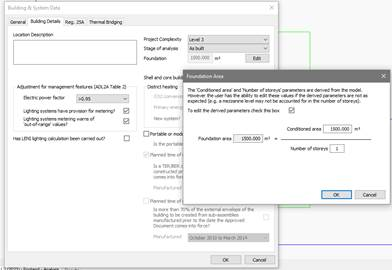
Foundation
Foundation area is utilized to set notional PV area; pressing the edit button displays an edit dialog where the area and # of storeys can be set. Default values are inferred from the model but these may not be accurate with certain geometries, so use inspection is required.
Shell and Core Building?
Tick this option to define building as a shell and core building (shell and core rooms as defined on Building regs tab of Room Data)
District Heating
This section is only active when a system with Heat source/fuel type set to District Heating is assigned to a room in the building.
District Heating CO2 Conversion Factor: Enter the CO2 Conversion Factor to be used by systems whose heat source/fuel type is District Heating.
Primary Energy factor: The conversion factor used to calculate the Primary Energy consumption associated with the District Heating system energy use.
Portable or Modular Building
Tick to define the building as Portable or Modular and set the related inputs Planned time of use in given location and further related input options.
Is mains gas supply available on site? (Wales only)
Tick if mains gas is available on site.
The following parameters apply to EPC analysis only
Inspection date
The date on which the energy assessor inspected the building for the purposes of energy calculations for the EPC.
Enter in the format dd/mm/yyyy
UPRN
The Unique Property Reference Number (UPRN) of the building (must be 10 or 12 digits). May be used instead of Previous RRN.
Previous RRN
The Report Reference Number of an EPC which was done for the building previously, if available. May be used instead of UPRN.
Does the building have special conservation status?
Tick the box if the building has a special conservation status (i.e. the building has been identified as being: one of special architectural or historical interest, in a conservation area, in a designated area of special character or appearance, or of traditional construction).
Aircon system present?: Specify if air conditioning system is present in the building (if applicable).
Total effective rated output: If actual output is known then choose ‘EXACT’ and enter value in ‘exact rated output’ input else choose dropdown option that matches estimated value.
Inspection status: Indicate whether an air conditioning inspection been commissioned for compliance with Energy Performance of Buildings Regulations.