2.4.8 Step 8. Edit Room Data
When creating Room Templates it is important to understand which Room Template settings will be used in VE Compliance, which are overridden by standard activity-based settings, and which are editable.
The content of the Room Data tabs and their function in Part L (2021) is summarised below. A fuller account is given in the section 5, Room Data.
General tab
The General tab displays general data about the room, including its name, ID, floor area measures and templates.
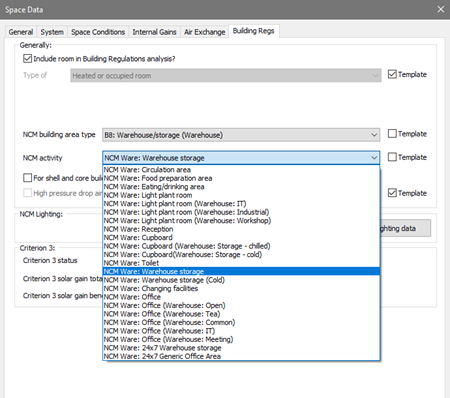
The NCM Template is unique to VE Compliance, and is used to import the NCM activity data applicable to the room. Each heated or occupied room (defined using the ‘Type of room’ setting on the ‘Building Regs’ tab) must be assigned an NCM activity. This defines the standard operation pattern of the room for the purpose of L2 (2021), which is defined by attributes on the various Room Data tabs. The assignment of these Room Data attributes is effected by the NCM template corresponding to the activity.
Each NCM building type has a predefined list of NCM activities available to its rooms.
As noted above, it is recommended that the NCM activity is set as an attribute of the Room Template. This saves work as it means that the activity will be automatically set for all rooms assigned that template. An NCM activity is only meaningful in the context of a building type, so this, too, must be set in the template.
If the NCM activity is set in the template it may (like other template settings) be overridden in the room by un-ticking the Template check box and selecting an alternative activity from the drop-down list.
For unheated rooms (those with Type of room set to anything other than Heated room), the NCM activity is undefined and is not displayed. In this case a special NCM template called ‘NCM unheated space’ is automatically assigned to the room.
Building Regs tab (data taken from Room Template but editable)
This tab is displayed only in VE Compliance. Some of the fields can be set in the Room Template. Others appear only in the VE Compliance and can be set on a room-by-room basis, using Edit Group Attributes or via Tabular Room Data.
The check box Include room in Building Regs analysis? is shown when a room is queried or selected whilst in VE Compliance allows you to restrict the Part L analysis to part of the building only.
The Type of room attribute is normally set to ‘Heated or occupied room’, but the following alternative settings are provided to cover various types of unheated space:
· Unheated roof – use this type for an unheated roof space lying outside the insulated building envelope (i.e. where the insulation is at ceiling level).
· Glazing cavity (required only rarely) – use this type for a glazing cavity that has been modelled as a separate room for simulation purposes.
· Other buffer space – use this type for other types of unheated space attached to the building but lying outside the insulated building envelope. Examples are car parks and lean-to outbuildings.
· Internal void or warm roof – use this type for floor and ceiling voids, and for roof spaces that lie inside the insulated building envelope (ie with insulation at rafter level).
In the case of the first three types listed above – all representing types of unheated buffer space – an external ventilation rate must also be entered for the purpose of calculating U values. All the above types of room are excluded from the floor area summation upon which the emission ratings are based.
The settings NCM Building area type and NCM Activity together specify the activity assigned to the room for the compliance analysis, which in turn (via the NCM Template) sets the standard conditions applied for occupancy and plant operation. While these attributes are optional in the Room Template, it is a good idea to set them there to save effort in VE Compliance.
For shell and core building, room is part of core area? relates to the special rules applying to shell and core buildings, rooms belonging to the shell area being treated differently from those belonging to the core area. This box is used (where applicable) to make this distinction.
High pressure drop air treatment does not apply to Part L2 (2021).
NCM lighting data opens the NCM lighting data dialog, which is described in section 5. This defines the characteristics of lighting control systems which are to be modelled using the NCM simple lighting control method. Lighting gains which are subject to this type of control must be identified on the Internal Gains tab.
The Building Regs tab also displays the results of the limiting solar gains assessment for the room, as detailed in section 5.
Space conditions tab (data taken entirely from NCM template)
The data set on this tab in the Room Template will be ignored in VE Compliance (but it will be used for assessments of the real building in the Apache module).
In VE Compliance, the data on this tab can be viewed but not edited. It is taken from the NCM Template as part of the specification of standard occupancy and plant operation conditions.
System tab (taken from Room Template, but editable)
The data set on this tab in the Room Template will be used in both VE Compliance and in the Apache module.
In either of these views, data on this tab is initially taken entirely from the Room Template (but as usual you have the option to override this data in individual rooms) or via Tabular Room Data (as applicable).
For compliance assessments, the important parameters on the System tab are the following.
In the Systems box:
· HVAC system – this indicates the Apache System serving the room’s space conditioning needs
· DHW system – this indicates the Apache System serving the room’s hot water needs including any solar energy system. An individual DHW system is recommended.
In the System outside air supply box:
· Free cooling flow – this indicates the maximum intake of outside air that is available for free cooling. In the case of a naturally ventilated room, a value of 5 ach would be typical to model ventilation by window opening. In the case of an air conditioned room, where the outside air is brought in via the system, it would be usual to express the value in l/(s·m2) and a value of 0.5 in l/(s·m2) would be typical. Note that this figure represents the additional outside air intake over and above the minimum ventilation level. Free cooling is covered further in the User Guide.
Parameters on the System tab that can be ignored are:
· Auxiliary ventilation system – this is not applicable because under the NCM conventions there is no conditioning of ventilation air.
· Sizeable parameters (shown in blue) – sizing plays no part in VE Compliance.
· Humidity limits – these are disabled for VE Compliance assessments in line with the conventions applying in the NCM systems approach.
· Flow rate and profile for System outside air supply – in VE Compliance this type of air supply is replaced by standard ventilation patterns handled by Auxiliary Ventilation air exchanges.
The setting of data on the System tab is closely linked with the setting of data in Apache Systems, which is dealt with below.
Internal gains (taken from NCM Template – lighting editing permitted)
In the VE Compliance Space Data, this data is taken from the NCM Template as part of the specification of standard occupancy and plant operation conditions. It can be viewed but, with the exception of the lighting data, should not normally be edited.
An exception to this rule can occasionally be appropriate where rooms have been subdivided with horizontal partitions for modelling purposes. In such cases it is permissible to distribute the gains as appropriate among the sub-spaces. However, it is your responsibility to ensure that the total gains for the room are as specified in the NCM template.
The lighting data in VE Compliance has a special status. Whilst it is initially set from the NCM Template (activity) it may be edited in order to model improvements to lighting system efficiency over that assumed in the notional building. The types of edit permitted are a) changes to the gains and associated power consumptions of the lights and b) changes to the profiles applied to the lighting.
The lighting levels laid down for the different NCM room activities are specified in terms of a lighting illuminance (lux). The rules for the notional building translate this to a power consumption (and corresponding room gain) expressed in W/m2 using an installed power density factor (W/m2 per 100 lux). The power density factor set in the NCM database is 1.56 W/m2 per 100 lux for offices and similar rooms such as classrooms, seminar rooms and conference rooms. In an office, for example, an illuminance level of 300 lux lighting level would require a power input of 4.669 W/m2.
A min and max lighting lux level specified in the NCM activities database. If the entered design illuminance is less than the minimum lighting level the general power density will be automatically pro-rated (up) to the activity’s NCM minimum lighting level.
However, the lighting data is not fixed at the NCM template values, and there are a range of ways of specifying reductions to lighting power consumption in the actual building, achieved either by efficient lighting systems or by lighting controls. These options are described in Section 5.6.
It is important to emphasize that where changes are made to the lighting data, this must be done in the rooms, not in the NCM Template (which is uneditable). Data for a group of rooms may be edited together by means of the ‘Tabular space data’ toolbar icon.
Air exchange (auxiliary vent from NCM Template, other vent from Room Template)
Some of the data on the Room Template’s Air Exchange tab is used in VE Compliance, and some is overridden. The rules are as follows.
The activity (NCM Template) for a room specifies a rate and a schedule for minimum ventilation supplied to the room. This ventilation appears in the NCM template as an air exchange of type Auxiliary Ventilation, which replaces any other Auxiliary Ventilation air exchanges that might be assigned to that room by means of the Room Template or manual additions. By contrast, other types of air exchange (those of type Infiltration or Natural Ventilation) assigned to the room by the template or otherwise are retained in VE Compliance.
One further rule is that any settings for ‘System outside air supply’ on the System tab are, like Auxiliary Ventilation air exchanges, ignored in VE Compliance.
Under normal circumstances auxiliary ventilation should not be edited, as this data forms part of the NCM activity specification. There is one exception to this rule: if ventilation is provided by an ApacheHVAC system (at the rate set in the NCM template), it would be necessary to turn off the auxiliary ventilation.
While the real (Apache View) and actual (VE Compliance) systems are in most respects identical, one difference is enforced in VE Compliance because of the way minimum ventilation is specified in NCM. For the real building there are controls on the Room Data System tab allowing you to specify air supplied to the room in the form of a ‘System air supply’. In VE Compliance all such air supplies are handled by Auxiliary Ventilation air exchanges, and for this reason the System air supply is disabled in this View. Following on from this the settings in Apache Systems dealing with setting the condition of the System air supply do not play a part in VE Compliance. In VE Compliance, ventilation is always supplied to rooms (or their terminal HVAC units) at outside air temperature, in accordance with principles laid down in the NCM methodology.
Infiltration in VE Compliance is derived from permeability and other parameters specified in the Building & System Data dialog.
More guidance on ventilation in compliance assessments is provided in Appendix A of this User Guide.