Exposure to sunlight hours assesses the extent of overshadowing and the overall access to sunlight.
Exposure to sunlight hours assessments are carried out on a single day between 1 February and 21 March with cloudless conditions. It is suggested that 21 March (equinox) be used. BS EN 17037 recommends that a space should receive a minimum of 1.5 hours of direct sunlight.
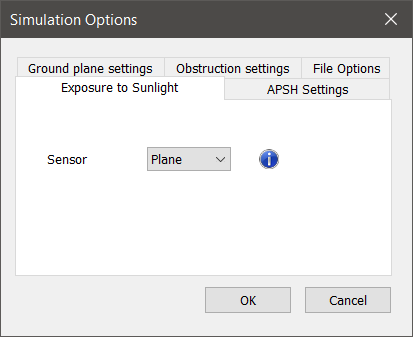
BR209 2022 3.1.12 defines a specific reference point (sensor) on windows to be used for this assessment. The sensor type utilised can be changed on the Exposure to sunlight settings dialog on the Simulation Options dialog.
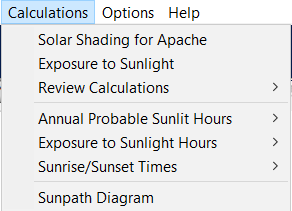
The Exposure to sunlight hours option is activated after a single design day exposure to sunlight simulation or from the Calculations drop-down menu, (note: this option will be greyed-out if the analysis tab has focus).
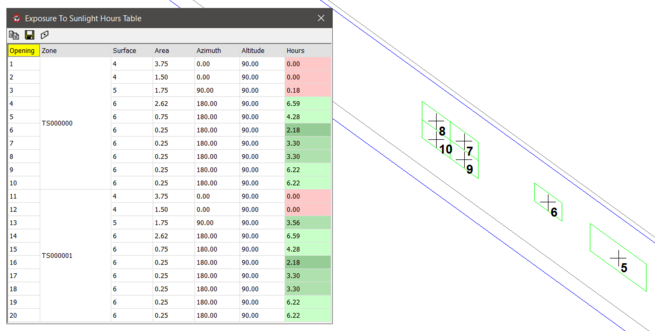
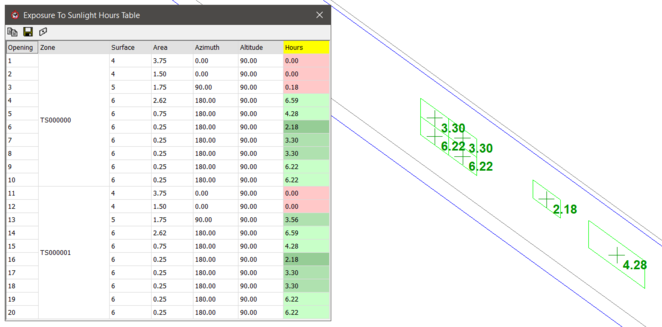
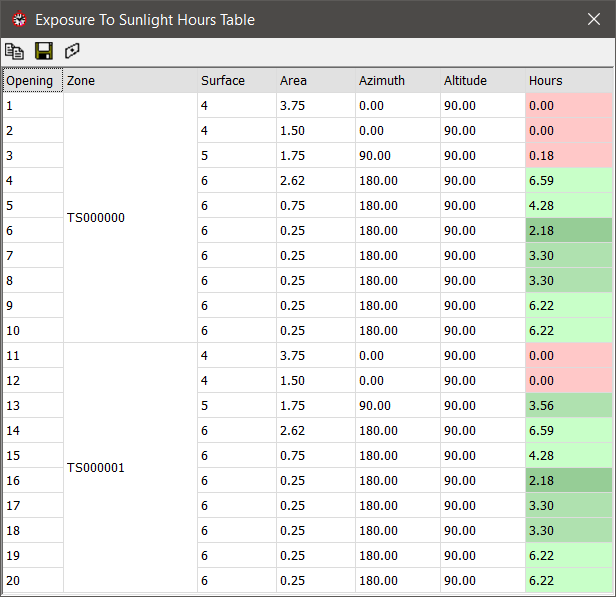
Selecting the Table option, pops-up a dialog showing the Exposure to sunlight hours results for the model; Exposure to sunlight hours results are provided in the table and colour coded for BS EN 17037 (table A6) compliance:
- Fail < 1.5 hrs red
- Min >= 1.5 hrs < 3.0 hrs dark green
- Medium >= 3.0 hrs < 4.0 hrs med green
- High >= 4.0 hrs light green
The view button on the toolbar is a toggle to display the Exposure to sunlight hours results on the ViewPort - Toggle the button to see the window "indices" (this can help to identify the position of each window on the model to its opening number to check corresponding results on that row)


 view button on the toolbar is a toggle to display the Exposure to sunlight hours results on the ViewPort - Toggle the button to see the window "indices" (this can help to identify the position of each window on the model to its opening number to check corresponding results on that row)