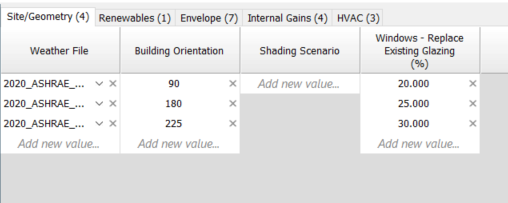
The tabs and parameters defined on the configure tabs and columns action appear in the entry pane.
Figure: Main dialog – entry pane.
The tab shows the tab name and in brackets the number of active parameters. The active parameters are displayed on the tab as columns.
In each column each row is a parameter value; select or type-in an entry. The final row in each column is a control that allows the user to add a new row. Each row has a X to delete the row but note that there is no undo feature.
It is important to note that the rows relate to each parameter column alone; there is no meaning to rows across parameter columns.
Obviously for some parameters reliant on model data, for example weather file, ASP file, constructions, shading scenario etc. the user will need to set-up the required data in the model prior to entering the parametric tool.