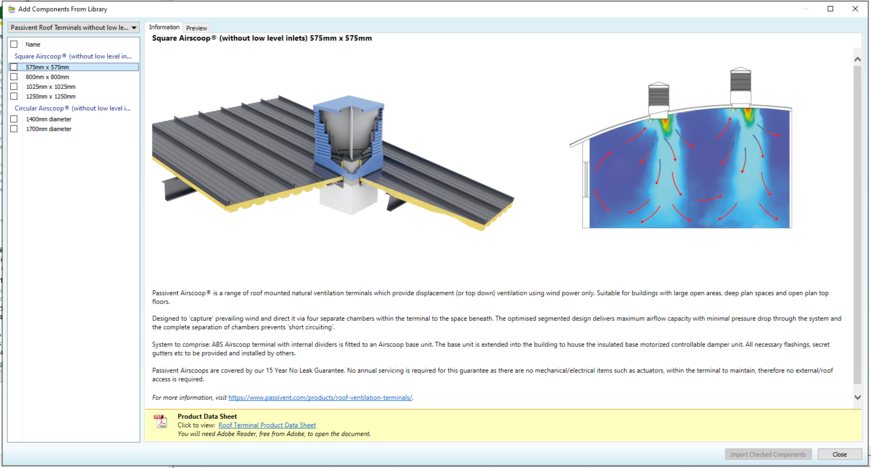
To get started with Passivent Roof Terminals, you will need to import the required unit(s) into your building model. The units are represented in the VE by components – when placed into a room, the room will automatically be updated to make use of the Passivent Roof Terminals® unit. You can import the units by clicking on the Import the Passivent products from library item in the navigator – this will open the Add Components From Library window with the Passivent Roof Terminals® (standalone) library pre-selected:
Fig 5: Component library
For the roof terminal (without low level inlets) products there are square and circular size variants.
Details on selecting which type of unit is be best suited for your project should be discussed with Passivent. You can review the overview of each unit by clicking on it – this will also lead to the Passivent product specification document.
To import the units, click on the checkbox next to the type(s) you want, then click on the Import Checked Components button. This will then copy the relevant component(s) into your model’s component library, making them ready to be assigned to rooms.
In addition to the unit(s) themselves, the import of a Passivent Roof Terminals unit to the model will also import some data into the project:
· Apache room templates for Passivent Roof Terminals ‘spaces’.
· Apache constructions for Passivent Roof Terminals surfaces.
· Macroflo types for Passivent Roof Terminals louvres.
· Apache profiles for Passivent Roof Terminals louvres and dampers (doors).
Once the units have been imported, you can close the Add Components From Library window by clicking on the Close button.