When using profiles in the UK Building Regulations Part L2 (2006) National Calculation Methodology (NCM) calculations using the IES ApacheNCM route to compliance, special considerations apply:
NCM Profiles
Special profiles are required for the NCM calculations, based on the NCM Building Type and the selected NCM Activity for the room. These are imported automatically from the NCM database using the <VE> template mechanism. However, although they are imported into your project database, they should not be edited. Therefore, when they are displayed, APpro will (by default) use the same dialogue box as is normally used for system profiles, where the profiles are un-editable.
The Allow NCM edits option allows you to override this – but this is for use in-house by IES and it is not recommended that you edit any NCM-specific database items.
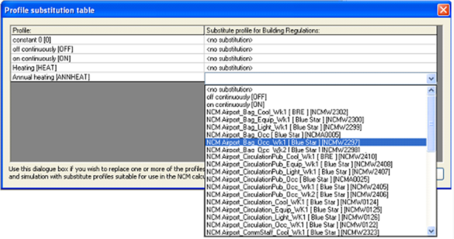
Profile Substitution Table
The profile substitution table allows you to replace each profile used in the standard design and simulation calculations with a substitute profile (usually but not necessarily an NCM profile) which is suitable to be used in its place for the Apache NCM calculations within the VE Compliance module: