This feature allows the user to import standalone time series profiles without the need for an iSCAN licence or any other interaction with the ICL, providing users with a standalone method of importing their data into the iVN
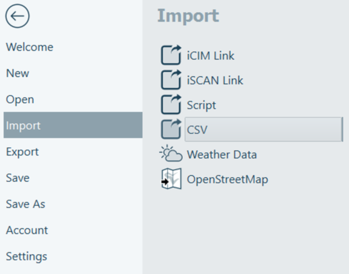
Figure 22: CSV Import location
By clicking the folder button this opens Windows Explorer where the user can select their desired CSV file.
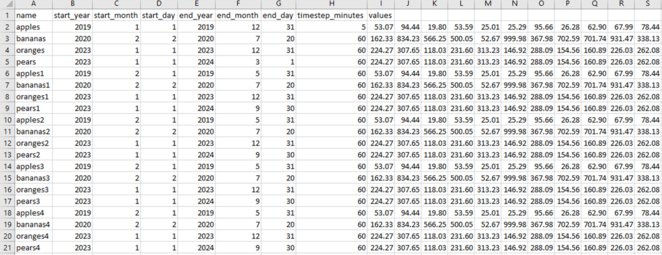
It is important to note that the CSV file must be in the following format to be imported correctly. More data formats will be available in future versions:
Figure 23: CSV File Format
The time series profile must have its start date and end date defined as well as the timestep in minutes defined in its row after the name, with the subsequent cells in the row holding the profile values as shown above.
Once a time series profile is imported, this profile can be interacted with in the same way as profiles imported via iSCAN.