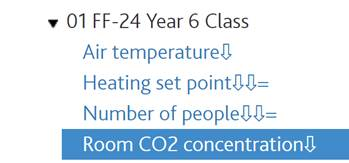
The Channel list shows all the channels available in the building from which a single channel can be selected to view or edit. The currently selected channel is highlighted blue. Default grouping of channels are categorised according to the level/owner combination they belong to. This list can be collapsed to show only levels, rooms and components when available.
Signs can be shown sometimes next to the channel name. These have a specific meaning:
·Star: Channel does not have units assigned;
·Arrow down (from one to three): the channels is checked to be exported as data channel (AMP), data channel (CSV), and or Free-form profile (FFD).
·“equal to” symbol: An expression is assigned to the channel.
·“not equal to” symbol: Expression assigned has an error.