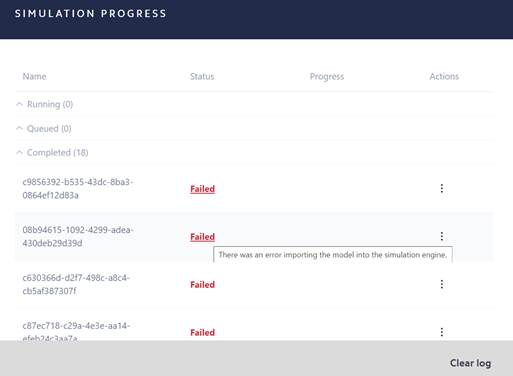
When a simulation fails, the simulation log informs the users via the “Failed” status
The user can hover over the “Failed” status in order to identify the stage at which the simulation failed.
With this update the user can access a more detailed report for two different error types:
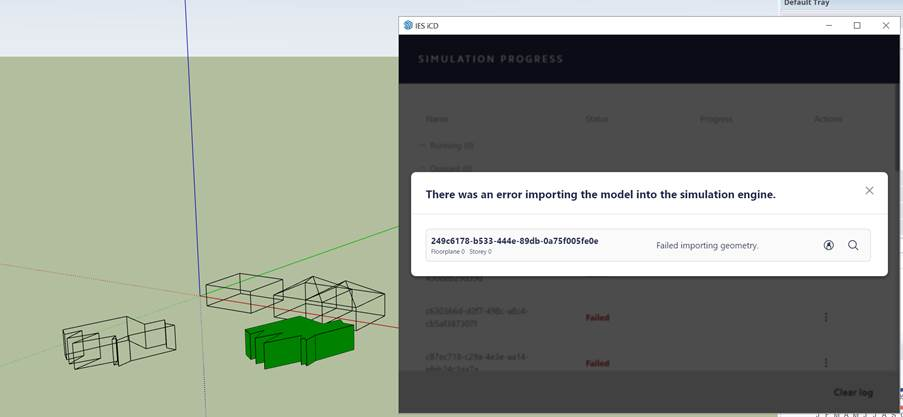
- When there is a problem with the geometry of a building (“There was an error importing the model to the simulation engine”)
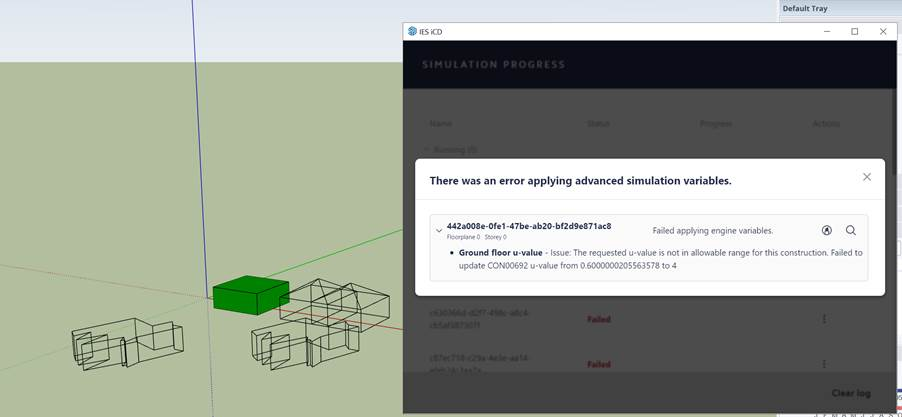
- When the attribute’s value of a building is not valid for the simulation (“There was an error applying advanced simulation variables”)
In both cases the “Failed” status is underlined and can be clicked on by the user to open the detailed report.
Figure 5-17 Simulation Progress Dialog
When opening the report, the ID of the building is displayed, as well as the space within the building concerned by the identified error. The user can highlight the building (highlighter icon) within the model as well as zoom to the building (magnifying glass icon) to facilitate its identification.
When the error is about an invalid data on an attribute the report can be expanded to identified the attribute that has a faulty value