The Water Calculation Options allows the end-user to perform water simulation by clicking the Run VE Water Calculation box is ticked.
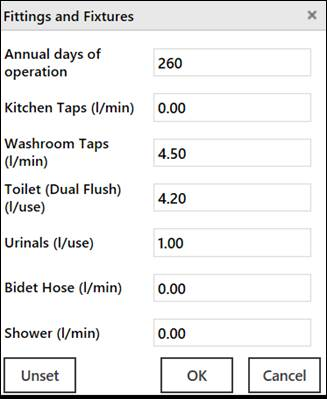
Note: it is advised to verify the flowrate values of the water fixtures (see chapter 4.9Editing Data section 4.9.2General). Once a building is selected, water flowrates can be found via Room/Building Query tool > General > Water fixtures. Clicking on the three dots next to it will open a window where the number of days of operation and water fixture’s flowrates can be set (as shown below in Figure 5-16).
Figure5-16Water Fixture dialogue box
Note: After ticking or unticking the Run VE Water Calculation box, it is necessary to click the Update button before launching the simulation.
The water calculation in iCD follows the LEED methodology (common to voluntary rating systems) and is based on the building type and the occupation level (calculated from the occupation attribute in m2/person).