4.11.1. Creating trees manually
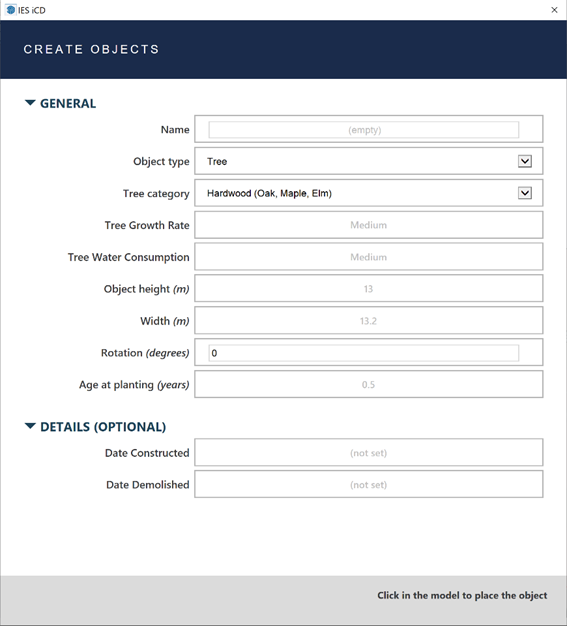
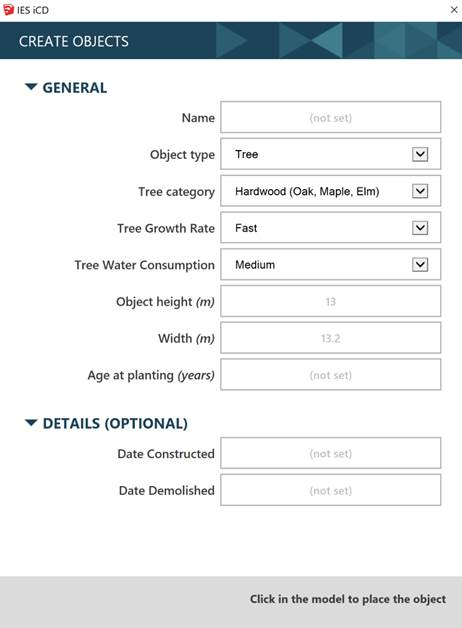
Select Create option < select Tree from Object type.
Create option  from the iCD toolbar can be used to add Trees to the model. Appropriate values can then be set for each attribute. Trees in the iCD have the following attributes:
· Tree Category: Determines the type of tree out of four available options: hardwood, conifer, evergreen and palm, each of which has a different appearance, carbon sequestration rate and water consumption.
· Tree growth rate: This determines the rate at which the tree will grow and can be set to slow, medium or fast. This has an effect the carbon sequestration of the tree. It set to Medium by default but can be changed if the user is familiar with the tree’s growth rate. See chapter 4.11.3.1 Carbon sequestration.
· Tree water consumption: Determines the amount of water consumed by the tree, which will show up in the site water reports. Can be set to low, medium or high. It set to Medium by default but can be changed if the user is familiar with the tree’s plant factor (PF). See chapter 4.11.3.2 Water demand calculation.
· Object height: Determines the height of the tree which will have an effect on shading.
· Width: Determines the width of the canopy which will have an effect on shading.
· Rotation (degrees): Orientation of the tree to the north (0° = north).
· Age at planting: Specifies the age of the tree when it was planted. Based on this the age of the tree in any given year is automatically updated. The age of the tree effects its rate of carbon sequestration.
· Date Constructed: Specifies the date that the tree was planted in the location.
· Date Demolished: Specifies when the tree was/will be removed from the site if applicable. Important if using the time dimension to assess a site across multiple years.
Click on the model to place the tree in the desired place.
Note: Data painter tool can also be used to copy / paste the Tree’s attributes from one tree to others (see 4.9.13 DATA PAINTER).
Note: Trees can be duplicated similar to other point objects like PV panels (see 4.10.2 Duplicate PV PANELS).
Figure 4-82: Create object - Trees