4.10.1. Creating PV panels
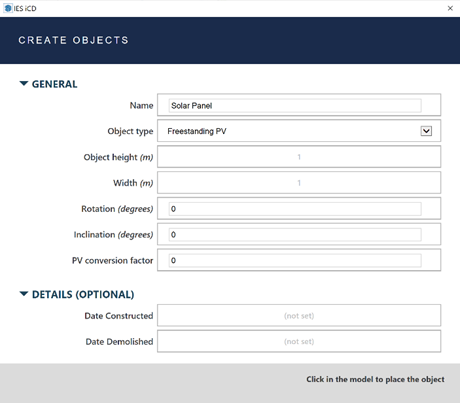
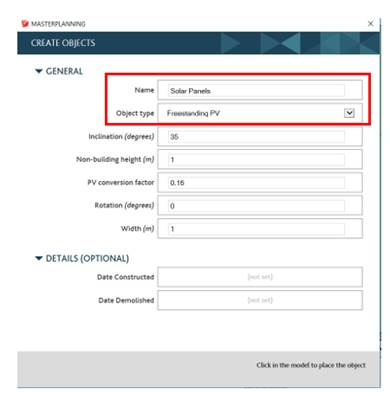
Select Create option < select Freestanding PV from Object type.
Create option  from the iCD toolbar can be used to add PV panels to the buildings. Set the appropriate values for each attribute. PV objects in iCD possess the following attributes:
· Object Height: Represents the height of the PV panel.
· Width: Represents the width of the PV panel.
Rotation (degrees): Orientation of the PV panel to the north (0° = north). For best results, the solar panels should face toward the equator. Simply speaking, in the Northern Hemisphere, face the panels south and in the Southern Hemisphere, face them north.
· Inclination (degrees): Optimum PV panel tilt/ elevated angle in degrees.
The optimum tilt angle is calculated by adding 15 degrees to the latitude during winter, and subtracting 15 degrees from the latitude during summer. For instance, for a model of Glasgow the latitude is 55° and since it is summer the optimum tilt angle for the solar panels will be 55 - 15 = 40°.
· PV conversion factor: The percentage of the solar energy that can be converted to usable electricity.
For solar photovoltaic (PV) cells, this means the ratio of useful electrical energy they produce to the amount of solar energy incident on the cell under standardized testing conditions. Most commercial cells are below 30%.
· Date Constructed/Date Demolished: This can be used to add the PV panel installation date.
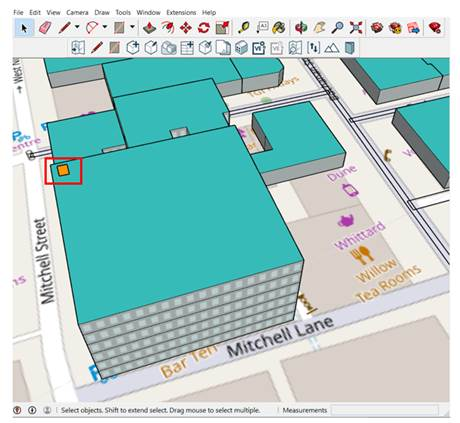
Click on the model to place the PV panel in the desired place (Example: click on the building roof to place the PV panel on the roof).
Note: Data painter tool can also be used to paste the PV panel properties from source PV panel to others (see 4.9.13 DATA PAINTER).
Figure 4-79 Create Objects – PV Panel
Figure 4-80 PV panel placed on a roof in iCD
Note: It is also possible to auto-generate PV panels on most exposed roof surfaces using the Solar assessment tool (see 5.3 Solar Assessment and Roof solar potential)