3.3.2. Carbon Coefficient Emission
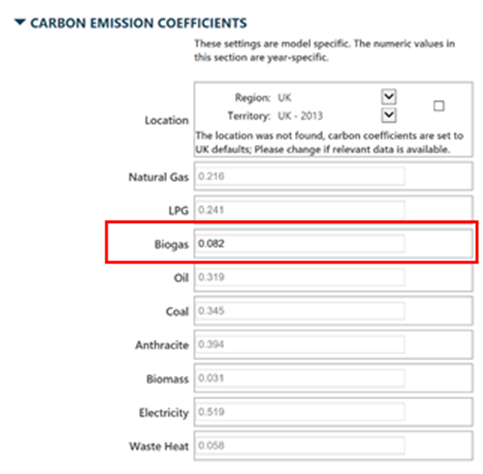
This option allows end users to set the carbon emission coefficients for each type of commodity based on the applied ratio in the country the model is located in (see Figure 3-7).
It is possible to keep the pre-set coefficient or to manually overwrite each coefficient.
Note: Pre-set coefficient are available only for the following locations:
· United Kingdom coefficients
· Australia Green Star and Nabers Energy coefficients
· USA Grid coefficients
· New-Zealand Green Star coefficients
If the model is geolocated in one of the 4 countries listed above, iCD will automatically select the appropriate pre-set of coefficient. Otherwise iCD select the UK coefficient by default (see Figure 3-7).
It always possible to overwrite these coefficients or change the location (Region or Territory).
To edit a value simply click the desired cell and type the value. Note that manually-entered values are displayed in plain black (see Biogas value on Figure 3-7 below).
Figure 3-7: Manually entered carbon emission coefficients for Biogas
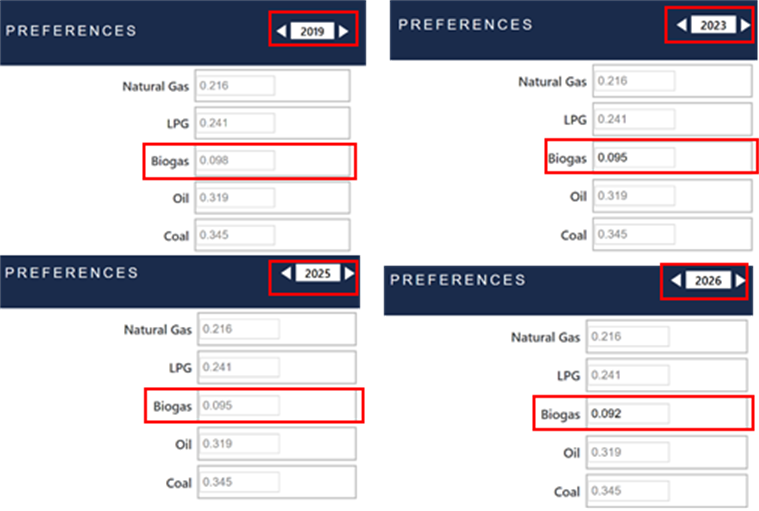
Note: Carbon Emission Coefficient are time sensitive. Values entered manually are applied to the year displayed in the top right of the dialog (see Figure 3-8). All the following years retain this value.
In the example below (Figure 3-8), the Biogas default value is set to 0.098. It is manually edited to 0.095 for year 2023. And then modified again to 0.092 in 2026. Note that for all the year before 2023 the default value applies. For 2023-2025, the value entered in 2023 is applied. For all the year from 2026 onward, the value entered in 2026 is applied.
Figure 3-8 Setting evolving Carbon Emission Coefficient over time
Note: these coefficients are expressed in kg CO2 per kWh.